How to optimize videos for SEO (YouTube and your own site)
SearchBlueprint · · 13 min read · scored 92/100
To optimize videos for SEO, target one search phrase per video, place it in the title, the first line of the description, and the spoken script, then add captions, chapters, and a custom thumbnail. If the video lives on your own site, add a transcript, VideoObject markup, and a player that loads fast.
That is the whole job in one paragraph. The rest of this guide unpacks each step, shows what YouTube and Google measure, and flags the places where teams pour hours into work that moves nothing.
Where an optimized video can rank

Video SEO covers three different placements, and each one plays by slightly different rules. A video can rank in YouTube search, where it competes on relevance and engagement. It can appear in Google's video results and key-moment features, where metadata and structured data do the heavy lifting. And it can strengthen a page on your own site, where it lives or dies by load time and supporting text.
The competition is real on every front. BrightEdge reports that 87% of online marketers generate video content, and that about a third of online activity is spent watching video. Publishing a video is no longer a differentiator. Optimizing one still is, because most uploads ship with an unedited title, an empty description, and no captions.
Start with keyword research, not the camera
Everything downstream depends on choosing a phrase people search for. YouTube keyword research works differently from classic SEO because you have to think like a viewer, not a writer.
Work through four sources:
- YouTube autocomplete. Type your topic into the search bar and read the suggestions. These are real queries from real viewers, and a suggestion like "for beginners" tells you exactly which angle has demand.
- A keyword tool. Semrush suggests aiming for terms with steady demand, around 500 or more monthly searches, that are not already crowded with strong videos. Long-tail queries in a niche often have almost no optimized competition.
- Competitor videos. Open the top-ranking videos for your target phrase and study how their titles, descriptions, and tags use it. Tools like vidIQ and TubeBuddy surface the tags those videos rely on.
- Google Trends. Rising topics reward early movers. A video published before a trend peaks can hold its ranking for months, because optimized videos compound instead of fading the way social posts do.
Write question-form keywords into your list too. Many viewers now search by asking full questions through voice assistants, so "how much does rewiring cost" can outperform a fragment like "rewiring cost" as a title. The intent logic is the same one that decides which searches book jobs for electricians: a "how to" searcher wants a demonstration, and a "near me" searcher wants proof and a phone number.
Then slot each video into your editorial calendar the same way you would slot articles when you build an AI-powered content plan: one primary keyword per asset, mapped before anything gets produced, so two videos never compete for the same query.
Optimize your video metadata
Metadata is the text layer the algorithm reads first. Every field has a spec, and staying inside those specs is half the work.

| Element | Limit or spec | Where the keyword goes | Why it matters |
|---|---|---|---|
| Title | 100 characters allowed; keep it under about 70 | Near the front, once | Anything past roughly 70 characters gets cut off in most search results |
| Description | Up to 5,000 characters; write at least 250 words | In the first 25 words, then 2 to 4 times total | The description is how the search engine knows what the video is about |
| Tags | 5 to 10 relevant tags | Primary keyword as the very first tag | YouTube weighs the first tags most and ignores irrelevant ones |
| Chapters | First stamp at 0:00, at least three stamps, each 10 seconds or longer | In short, descriptive chapter titles | Chapters can surface as key moments in both Google and YouTube |
| Thumbnail | 1280 x 720 pixels, 16:9, saved as JPG, GIF, or PNG | Not applicable; design for the click | Thumbnails drive click-through rate, which feeds rankings |
Titles that earn the click and keep the promise
Lead with the keyword phrased the way people speak, then attach a concrete benefit. Semrush's example makes the point well: a title like "How to Get 1000 YouTube Subscribers in 30 Days" tells viewers exactly what they will learn, while "My YouTube Journey" tells them nothing. Specific numbers help. So do plain words instead of jargon.
One warning: the title is a contract. YouTube measures what happens after the click, so a misleading title buys a spike of views and then pays for it in abandoned watch sessions. A boring, accurate title beats an exciting, false one over any period longer than a week.
Descriptions are 250 words, not one line
Most creators write a sentence and stop. The field holds 5,000 characters, and the guidance that consistently appears across the top-ranking advice is to write at least 250 words, use your keyword within the first 25 words, and repeat it naturally 2 to 4 times across the whole thing. Add your chapter timestamps, links to related resources, and a few relevant hashtags at the end for extra discoverability.
Tags, hashtags, and the channel itself
Tags carry less weight than they once did, but they still provide context and catch common misspellings. Use 5 to 10, with your primary keyword first.
Channel-level fields matter too, and almost nobody touches them. The first 100 to 150 characters of your channel description appear next to your channel in search results, so state what you cover and for whom right there. Channel keywords, set in YouTube Studio under channel settings, tell the platform what kind of content you produce and who it is for.
Make the video itself indexable
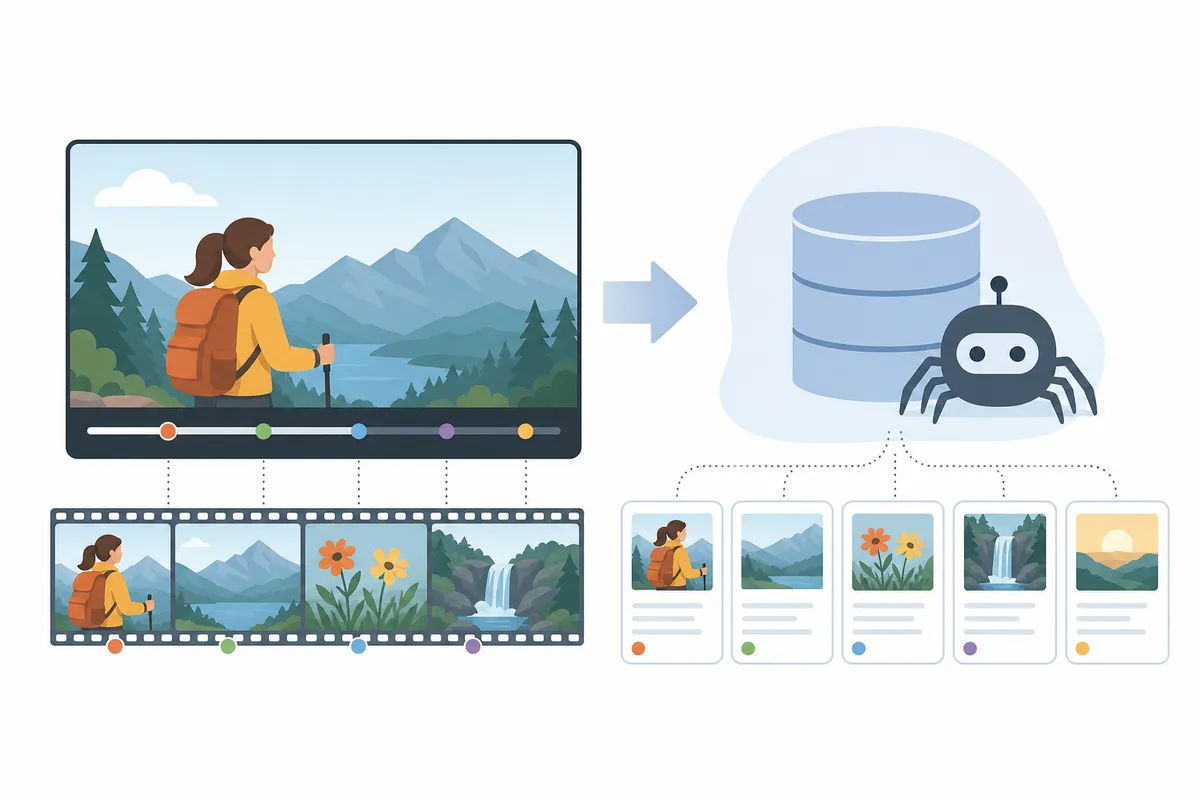
Crawlers cannot interpret pixels and audio. This section is about converting what you filmed into text a machine can read.
Captions and transcripts
Upload your own caption file rather than relying on auto-captions, which still mishear names, product terms, and accents. Accurate captions mean that when someone searches a phrase you said fourteen minutes in, YouTube can match your video to it. They also make your content watchable in silence, which is how a large share of viewing happens.
Say your target keyword a few times in the narration itself, naturally. The captions carry it to the algorithm without a single on-screen change.
For international reach, YouTube's multilingual features, launched in 2023, now include better caption accuracy and AI-driven dubbing. The platform reports stronger engagement for creators who localize their top videos into a few key languages instead of trying to cover every market.
Chapters and timestamps
Chapters split a video into searchable sections that can appear as key moments in Google results. The mechanics are strict: the first timestamp must be 0:00, you need at least three, and each chapter must run 10 seconds or longer. Treat each chapter title as a mini-keyword. "Finding the right keywords" earns a key-moment placement in a way "Part 2" never will.
Thumbnails
YouTube auto-generates three frames to choose from. Skip all three and upload a custom image at 1280 x 720 pixels in a 16:9 ratio. The thumbnail is the single biggest lever on click-through rate, and click-through rate is one of the signals the ranking systems watch. Readable text, a human face, and high contrast at small sizes are the reliable ingredients.
How to optimize videos for SEO on your own site
YouTube optimization gets most of the attention, but the videos embedded on your service pages, product pages, and blog posts follow different rules. Here the ranking unit is the page, and the video is either an asset or a liability.
Pick the right hosting for the job
| Hosting option | Search reach | Control over the experience | Best for |
|---|---|---|---|
| Upload to YouTube and embed on your page | Highest: YouTube search, Google video results, and recommendations, plus your page | Moderate: the player carries YouTube branding and suggested videos | Discovery topics people actively search for |
| Dedicated video host (Vimeo-style platforms) | Lower: the ranking value accrues to your page rather than a platform | High: clean player and tighter design control | Product demos and pages where you want the viewer to stay on your site |
| Self-hosted file built into the page | Depends entirely on the page's own SEO | Full control, and full responsibility for compression and delivery | Short clips and background footage |
Embedding a YouTube upload gives you both surfaces at once, which is why it is the default choice for most content. A dedicated host earns its keep on conversion pages, where a "watch next" rabbit hole is the last thing you want.
Speed is the tax every video charges
Google found that 53% of users will click off a mobile page if it takes more than 3 seconds to load, and over half of video content is consumed on mobile. A heavy, eagerly-loaded player can single-handedly push a page past that line. The fixes are unglamorous and effective: compress anything self-hosted, lazy-load the player so the rest of the page renders first, and never run a background video on an endless loop. Let viewers press play themselves. Forced autoplay reads as hostile, and mobile browsers frequently block it anyway.
Placement matters as well. If the video is the main content, put it near the top of the page. If it supports an article, place it beside or within the relevant section rather than parking every video above the fold out of habit.
Transcripts and VideoObject markup
Publish a transcript or a written summary on the page itself. It is the only way the video's substance enters the page's indexable text, it serves viewers who cannot turn the sound on, and it carries your keywords without any stuffing.
Then add VideoObject structured data, using the vocabulary defined at Schema.org, so search engines can read the video's title, description, thumbnail, and duration directly. Google's documentation at Google Search Central covers the video structured data and technical requirements that make pages eligible for video features in search. This is the step that separates a page Google understands from a page Google guesses at.
Local and service businesses get outsized returns here. A clinic that films sixty-second answers to the questions owners search before booking, and embeds each one on the matching service page with a transcript, is building the same trust machinery that decides who owns "vet near me" results in text search.
Feed the signals that decide video rankings
Metadata gets a video into the running. Engagement decides where it finishes.
What the algorithm weighs
YouTube's systems evaluate relevance first, from titles, descriptions, captions, and even spoken content, then rank on how viewers respond. Watch time remains a major signal. Click-through rate matters. So do comments, shares, and new subscriptions. YouTube also collects millions of responses through built-in satisfaction surveys and feeds them straight into recommendations, which is why "did the viewer feel this was worth it" beats any single metric you can game.
Todd Beaupre, YouTube's senior director of growth and discovery, has said on the platform's Creator Insider channel that there is no single answer to which metric matters most. The weighting shifts by context: watch time can matter more for long-form podcasts, while click-through rate can carry more weight on mobile than on a TV screen.
HubSpot, which credits this approach for scaling its own channel to roughly 399,000 subscribers, puts the practical conclusion bluntly: if your videos actively solve your prospective customers' problems, you have done 90% of the optimization work.
Shorts play by their own rules
Shorts run through a separate recommendation system that measures fast engagement, chiefly completion rate and replays. Shorts can now run up to three minutes, but longer is not safer: Semrush notes that a 30-second Short which 90% of viewers finish often outperforms a longer one with weaker completion. Treat Shorts as a discovery channel that hands viewers to your long-form library, not as a separate content strategy.
Promote, measure, and adjust
A video that earns engagement in its first days gets shown to more people, so distribution is part of video SEO rather than an afterthought.
The cheapest source of video ideas is content you already own. A one-minute explainer summarizing a blog post can be embedded in the post as rich media, shared on social with a link back, and published on YouTube with cards pointing to the original page. One production effort, three surfaces. That reuse discipline is the same one that lets teams scale content production without losing rank: the research is done once and the formats multiply.
Inside YouTube, use cards and end screens to route finished viewers to the next relevant video. Longer sessions on your content are themselves a positive signal.
Then measure like you would any other channel:
| Funnel stage | Metrics to track | What it tells you |
|---|---|---|
| Top of funnel | Landing page traffic, player impressions, bounce and exit rates | Whether the video is being found and whether the page holds people |
| Middle of funnel | View time, plays and stops, completion rate | Whether the content itself keeps attention |
| Bottom of funnel | Clicks on cards and end screens, conversions from referral traffic | Whether watching leads to action |
YouTube Studio covers the platform side. For the business side, fold video metrics into the same reporting rhythm as the rest of your organic work; the guide on SEO reporting for stakeholders covers what earns a slide and what to cut. Review monthly, double down on the formats that hold retention, and re-optimize old titles and thumbnails on videos whose impressions are high but clicks are low.
Can you do video SEO yourself?
Mostly, yes. Titles, descriptions, tags, chapters, custom thumbnails, and caption uploads need no technical skill, and once you have a checklist, the metadata pass takes well under an hour per video. If you publish a handful of videos a month, do this in-house.
The on-site half is where help starts to pay. VideoObject markup, page speed diagnostics, lazy-loading players correctly, and auditing dozens of existing video pages for missing transcripts are developer-adjacent tasks, and mistakes there are invisible until rankings quietly fail to arrive. If your video pages have been live for months without traction, an audit will find the gap faster than trial and error will.
FAQs
How long should a YouTube video description be?
At least 250 words. The field allows up to 5,000 characters, and the consistent guidance is to place your keyword within the first 25 words and use it 2 to 4 times across the whole description, alongside timestamps and relevant links.
Do YouTube tags still matter for SEO?
Only a little. Tags provide minor context and catch misspellings, while captions and descriptions do far more. Use 5 to 10 honest tags with your primary keyword first, then spend your remaining time on the thumbnail instead.
Should I host videos on YouTube or on my own site?
Both, for different jobs. YouTube embeds win for discovery topics because they can rank in YouTube search and Google video results at once. A dedicated host suits conversion pages where you want a clean player and no suggested-video exits.
How do I get my video to show up in Google search results?
Give the page a transcript, VideoObject structured data, a fast-loading player, and a title and description that match the query. Chapters help too, since Google can surface individual key moments from a well-timestamped video.
Do Shorts help with video SEO?
Indirectly. Shorts run on a separate recommendation system driven by completion and replays, and they can now run up to three minutes. They rarely rank in classic search, but they grow the subscriber base that gives your long-form videos a stronger launch.
Talk to the team
Video pages usually fail for reasons an eyeball check misses: a missing transcript, a broken schema block, a player dragging load time past the three-second mark. Before you re-edit another batch of titles, look through a sample SEO report to see what a full crawl surfaces, then talk to the team about how to optimize videos for SEO across your entire site. One audit tends to replace a month of guessing.
Resources / References
Sources
- Search Engine Optimization (SEO) for YouTube: A Step-by- ...
- [Tips & Tricks) How To Get Better SEO : r/youtubers
- Video SEO: How to optimize videos on your site for search
- YouTube SEO: How to Optimize Videos for YouTube Search
- YouTube SEO: How to Rank Videos & Grow Your Channel
Disclaimer: This article is general information about rules and figures that applied when it was written, not personalised financial, tax or investment advice. It does not take account of your income, obligations, risk tolerance or goals, and rates and thresholds change. Verify the current position with the relevant authority, and speak to a licensed adviser or a qualified accountant before acting.
About the author
SearchBlueprint researched, wrote and scored this article with the content pipeline our customers run on their own sites. The score in the byline is what our content engine gave this page before it published. Nothing here is reviewed by hand, which is the point: it is the product's output, published where anyone can check it.