Master Step-by-Step Keyword Research to Drive SEO Success (And Actually Rank)
SearchBlueprint · · 9 min read · scored 97/100

An SEO keyword strategy is the decision that comes out of keyword research: which searches you will compete for, which page on your site owns each one, and in what order you will do the work. Research on its own gives you a list; the strategy turns that list into a plan you can hand to a writer on Monday.
Most keyword research stalls between those two. A spreadsheet of 500 phrases feels like progress and ranks nothing, because nobody decided what to do with it. The seven steps below go from your business goal to a ranked roadmap, with what Google's own documentation says at the points where it matters.
Keyword research and keyword strategy are different jobs
People use the two terms interchangeably, which is part of why so much research ends up unused.
| Keyword research | Keyword strategy | |
|---|---|---|
| Question it answers | What do people search? | Which of those searches will we win, with which page, and when? |
| Output | A list of phrases with volumes | A keyword map and an ordered roadmap |
| Tools | Keyword tools, Search Console, Google's suggestions | The research, plus your site, your budget and your goals |
| Done when | The list stops growing | Every priority search has an owner page and a date |
You need both. The steps below do the research inside the strategy, so nothing gets collected without a reason.
Step 1: Start from the business goal
Before opening any tool, write down what search traffic is for. A plumbing firm wants calls in its service area. An online shop wants sales of its best-margin products. An agency wants enquiries from a certain size of client. A B2B software company may want demo requests and signups for a free plan.
Then list the pages that serve that goal: service pages, product and category pages, pricing, the contact page. These are the pages the strategy protects. Articles and guides earn their place by bringing people who will later need those pages, and by attracting links and mentions that money pages rarely get on their own.
This step decides what a "good keyword" means for you. For the plumber, "emergency plumber Leeds" beats "how to fix a dripping tap" every time, even though the second is searched more.
Step 2: Build a seed list from your customers and your own data

Seed keywords are the handful of core phrases that describe what you sell and the problems you solve. The best ones come from sources a tool cannot see:
- Search Console's Performance report. Sort queries by impressions for the last three months. These are searches Google already shows your site for, which makes them the strongest seeds you have.
- Sales calls, enquiry forms and reviews. Customers describe problems in their own words, and those words are what they type.
- Your site search, if you have one. It records what visitors could not find.
- Competitors' navigation. Whole sections a competitor has built tell you which topics they think pay.
Google's starter guide makes the point with an example: some people search "charcuterie" and others "cheese board" for the same thing. Your seed list should include the words your customers use, especially when they differ from your own. Ten to twenty seeds is enough for a small business; the next step multiplies them.
Step 3: Expand the list with tools
Each seed now becomes many related phrases. Use more than one source, because each shows a different slice.
| Source | What it adds | Cost |
|---|---|---|
| Google autocomplete and "People also ask" | Real phrasing and follow-up questions | Free |
| Google Keyword Planner | Related ideas, monthly search estimates and ad cost | Free inside a Google Ads account |
| Keyword tools | Volumes, difficulty and many variants at once | Free tiers and paid plans |
| Competitor ranking reports | Searches rivals win that you have no page for | Usually paid |
Google's help page for Keyword Planner says it suggests keywords related to your products or website and shows estimates of monthly searches and of what it costs to target a keyword with ads. You need a Google Ads account with billing details completed to see ideas, but no running campaign. For free checks without an account, our keyword suggestions tool returns up to 50 related searches per seed with volume and a difficulty score, and the People also ask finder pulls the questions Google surfaces.

To see which searches competitors already win, the lesson on finding competitor keyword gaps walks through it step by step.
Step 4: Cut the list down to searches worth a page
This is where the strategy is made. Go through the expanded list and keep a phrase only if it passes four checks.
- Intent: does the searcher want something you offer? Search the phrase and read page one. If it is all how-to guides, the searcher is learning; if it is product listings, they are buying.
- Format: can you build the kind of page that page one shows? A local service page will not rank where Google shows national comparison articles.
- Winnability: are the top results pages you could realistically beat? Big brands with deep, well-linked pages on every result usually mean wait or narrow the search.
- Value: if you ranked, would those visits lead toward one of the pages from step 1?
Difficulty scores help with check three, but read them as one tool's estimate. Google's own page on hiring an SEO points out that third-party tools have no access to its internal ranking data, and every tool computes difficulty its own way.
Score what survives so you can sort it. A simple version that works:
| Keyword | Intent fit (0-3) | Winnable (0-3) | Value (0-3) | Total | Decision |
|---|---|---|---|---|---|
| emergency plumber Leeds | 3 | 1 | 3 | 7 | Service page, longer project |
| boiler pressure dropping | 2 | 3 | 2 | 7 | Guide linking to boiler repair |
| how to bleed a radiator | 1 | 2 | 1 | 4 | Low priority |
| plumber salary UK | 0 | 2 | 0 | 2 | Drop: job seekers, not customers |
The numbers are made up for illustration; the habit of writing the decision down is what matters.
Step 5: Give every keyword one page
Group the surviving phrases by intent, so that phrases wanting the same answer sit together: "boiler pressure dropping", "why does my boiler keep losing pressure" and "boiler pressure low" are one group. Then assign each group to exactly one page, either one you already have or one you will build.
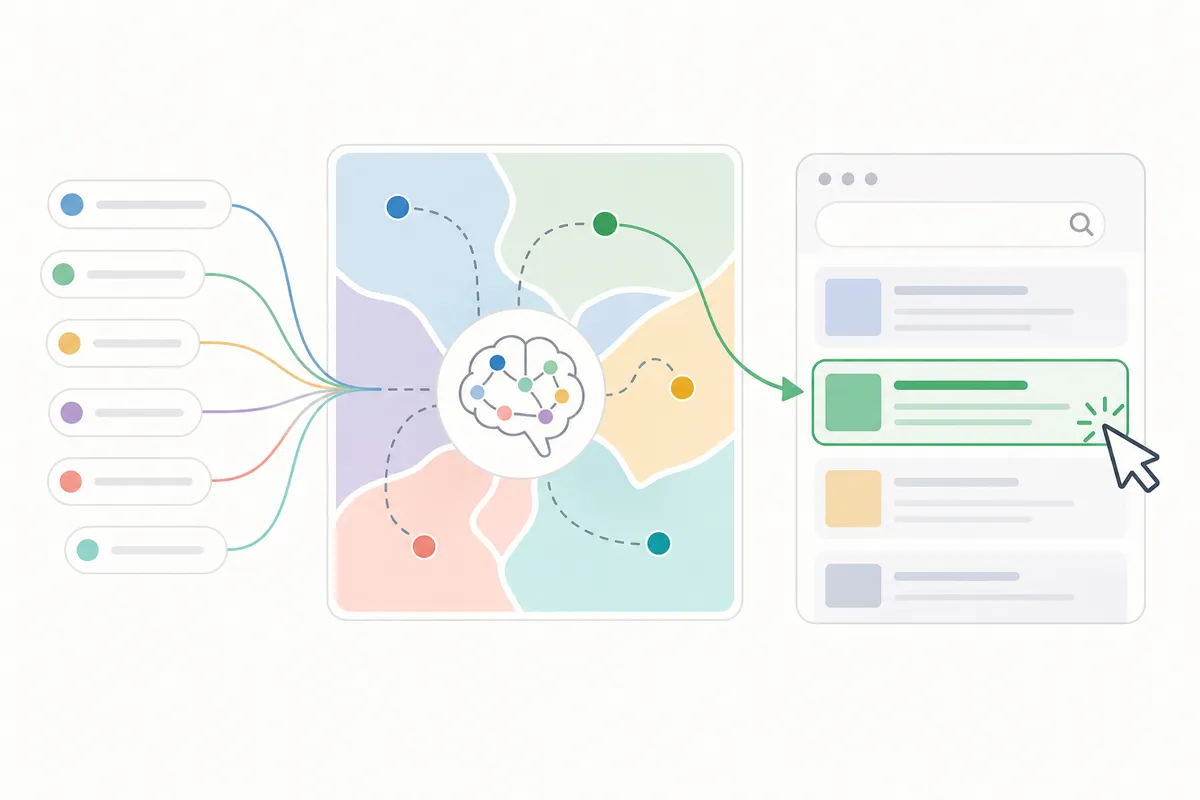
That record is a keyword map. Its main job is preventing two of your pages from chasing the same search, which is called keyword cannibalization. The map also shows the gaps: groups with no page yet become your content plan. The academy lesson on mapping keywords to pages covers the format.
A short example of what a map looks like:
| Keyword group | Main search | Owner page | Status |
|---|---|---|---|
| Boiler repair | boiler repair Leeds | /boiler-repair | Exists, needs a better title |
| Boiler pressure | boiler pressure dropping | /guides/boiler-pressure | To write |
| Emergency callouts | emergency plumber Leeds | /emergency-plumber | Exists, thin |
Step 6: Turn the map into a roadmap
A map says what to do. A roadmap says in what order. Sort the work into three lanes:
- Quick wins: pages that already show in Search Console for their main search at positions roughly 8 to 20. A sharper title, a section that answers the question better or two internal links from strong pages can lift them. Start here, because Google already connects the page to the search.
- New pages for winnable searches: groups with no page yet and a page one you can beat. Build these next, in order of value.
- Long bets: valuable, contested searches like "emergency plumber Leeds". Build the page now, then support it over months with links, reviews and supporting guides that link to it.
Plan the first quarter so each month has some quick wins alongside a new page or two. Early movement on the quick wins buys patience for the long bets.
Step 7: Measure, then review on a schedule
Google's starter guide says some changes take effect in a few hours and others take several months, and suggests waiting a few weeks before deciding whether a change worked, which means measuring in weeks, page by page. In Search Console's Performance report, filter to a page and compare impressions, clicks and average position before and after the change, and keep an eye on the queries list for searches you did not target.
Search also moves under a fixed plan. Google's search status page for ranking lists two core updates and four spam updates in 2026 up to October. A cadence a small team can keep:
- Monthly: clicks and position for the ten to twenty searches that bring customers.
- Quarterly: refresh pages that slipped, and add new questions from Search Console to the map.
- Yearly: rebuild the map. Merge pages that compete, and open new groups for searches the site can now win.
How AI answers change keyword strategy
Google's guide to AI features and your website says AI Overviews and AI Mode may use a "query fan-out": behind one question, several related searches across subtopics. So the follow-up questions in your groups matter more than they used to. A page that answers the main search and its natural next questions, each in a clear heading with the answer in the first sentence, gives these features more to use.
The same guide says there are no extra requirements to appear in AI Overviews or AI Mode, beyond being indexed and eligible for a snippet, and the strategy above already covers that. What changes is mostly emphasis: treat questions as first-class keywords, and keep each answer short enough to quote. Our query fan-out glossary entry explains the mechanism in more detail.
Keyword strategy for an agency with several clients
If you run keyword strategy for clients, the steps stay the same, and two habits save time. Keep one map per client in the same format, so a junior can pick up any account. And show the client the decisions, not the raw list: ten searches, the page that owns each, and the month it is scheduled. Owners rarely want to read 400 rows; they want to know what you will do and when they will see it in Search Console. Google's own advice to site owners hiring an SEO is to ask what results to expect and in what timeframe, so answer that before they ask.
Mistakes that sink keyword strategies
- Picking keywords by volume and discovering months later that the visitors never buy.
- Writing new pages for searches an existing page already targets.
- Skipping the page-one check, then building a guide where Google shows product pages.
- Chasing head terms first on a new site and seeing nothing for a year, when quick wins were sitting on page two.
- Never revisiting the map after Google's updates or a change in what you sell.
FAQs
What is an SEO keyword strategy?
It is the plan that decides which searches you will compete for, which page owns each one, and the order you will work in. Keyword research supplies the options; the strategy picks among them.
How many keywords should a small business target?
Enough that every important page has one main search and its close variants. For many small businesses that comes to a few dozen priority searches, grouped onto a smaller number of pages.
How long does a keyword strategy take to show results?
Google says changes can take from a few hours to several months to show, and suggests waiting a few weeks before judging. Quick wins on existing pages usually move first; new pages for competitive searches take longest.
Do I need paid tools?
Not to start. Search Console, Google's suggestions and Keyword Planner cover a small site. Paid tools help with competitor research and larger lists.
How often should I update my keyword strategy?
Check priority searches monthly, refresh slipping pages quarterly, and rebuild the map once a year or when you add a product or service.
Your next step
Open Search Console and list every query where one of your pages sits between positions 8 and 20; those are the quick wins your keyword strategy should start with. Check each against the four tests in step 4, then give it an owner page. Try our free keyword suggestions tool to find the related searches each owner page could also answer.
Sources
The facts in this guide come from these pages, each read on the date shown.
- SEO Starter Guide (Google Search Central, read 12 October 2026)
- Use Keyword Planner (Google Ads Help, read 12 October 2026)
- Do you need an SEO? (Google Search Central, read 12 October 2026)
- Performance report (Search results) (Search Console Help, read 12 October 2026)
- AI features and your website (Google Search Central, read 12 October 2026)
- Ranking incident history (Google Search status page, read 12 October 2026)
About the author
SearchBlueprint researched, wrote and scored this article with the content pipeline our customers run on their own sites. The score in the byline is what our content engine gave this page before it published. Nothing here is reviewed by hand, which is the point: it is the product's output, published where anyone can check it.