SEO for Single Page Apps: Why They Vanish From Google
By Toy Wen Da, Co-Founder · Updated · 22 min read · scored 94/100
SEO for single page apps breaks down for one reason: search engines often see a blank page where your users see a full interactive app. Your SPA loads fast and feels like software, yet it can still disappear from Google because Googlebot never receives the content it needs to index. Close the gaps in rendering, routing and metadata, and the same app can rank.

What a single-page app is
A single-page application, or SPA, loads one HTML file and builds the rest of the experience with JavaScript. Instead of requesting a fresh page from the server on every link click, the browser swaps content in and out of the same page, so there is no reload and no wait on the network.
That is the appeal, and it is also the root of every SEO problem in this article.
How SPAs differ from a traditional website
A traditional multi-page site sends a new, fully formed HTML document for every URL. The server does the work and the browser displays the result, so a crawler reading that HTML sees the same content a human visitor sees.
An SPA flips this. The server sends a nearly empty HTML shell plus a JavaScript bundle, and the browser runs that code to fetch data, build the page and insert content into the DOM. A crawler that stops at the raw HTML finds a script tag and an empty container.
Most SPAs are built with React or Angular, and Vue is common too. They differ in syntax and tooling but share one trade-off: speed and app-like interactivity in exchange for a harder path to visibility in search.
Common examples you already use
You touch single-page apps constantly, often without noticing:
- Gmail and Google Maps update content in place as you scroll, pan or zoom.
- Trello and Asana update cards and boards instantly without a page reload.
- Spotify's web player keeps browsing and playback on one continuous page.
- Airbnb's search and filter experience updates results as you adjust filters, with no new page load.
These products work as SPAs because instant feedback improves the experience; a Trello board that reloaded on every drag-and-drop would feel broken. None of them depend mainly on organic search traffic to new pages the way a content site, blog or e-commerce catalog does, and many teams only grasp that distinction after choosing this architecture for a marketing site.
Why single-page apps vanish from Google search results
Pages vanish from Google for one of three overlapping reasons: the crawler can't see the content, the content doesn't live at a crawlable URL, or Google indexes the page but treats it as thin or duplicate. SPAs are prone to all three at once.
The crawling problem
Googlebot requests a page in two stages. First it fetches the raw HTML, which for an SPA is mostly a <div id="root"></div> and a handful of <script> tags. Then it has to parse, compile and execute the JavaScript before it can see your actual content.
The second stage doesn't happen immediately. Google queues JavaScript rendering separately from the initial crawl, and the gap can run from seconds to several days depending on your site's crawl budget and server response times. Google Search Central documents this two-wave process: Google crawls the HTML, queues the page for rendering, then re-crawls the rendered output once resources allow. If your content-management pipeline, sitemap or internal links don't hold up during that gap, the page can be flagged as thin, skipped or never queued for a second pass. Our guide on how search engine indexing actually works and why pages get skipped covers the two-step process in more detail.
The rendering budget problem
Rendering JavaScript costs far more than reading static HTML. Google has to start a browser-like environment, download every script and dependency, run the code and wait for asynchronous data calls to resolve before it has the full page. On a site with thousands of URLs, you are asking Google to spend much more compute than a static HTML competitor requires.
Google's crawling infrastructure now runs on an evergreen rendering engine that tracks modern Chromium, so it can execute most contemporary JavaScript. That is real progress from a few years ago, but "can render it" is different from "will render it quickly, every time, for every page." Sites with large page counts or weak crawl signals can see render requests deprioritized, which shows up as pages sitting in "Discovered, currently not indexed" in Search Console for weeks.
The URL problem: one page, many views
The deepest structural issue is that a classic SPA has exactly one URL. Click through ten product pages and the address bar might stay the same or only append a fragment like #/product/42. To a crawler, a fragment after a # historically means "same page, different scroll position" rather than a new document worth indexing.
So Google may see one URL for your entire catalog, blog or app, however many distinct pages a human can reach. One URL means one index entry, one title tag, one meta description and one shot at ranking for one query. Everything else is invisible.
Is a single-page app good for SEO?

Yes, but only with deliberate engineering. An unmodified client-side-rendered SPA is bad for SEO by default. The same framework with server-side rendering, real URLs per view and per-view metadata can rank as well as a traditional site, so the default configuration is the problem and the architecture is fine.
What the page is for also matters. A few feature views inside a logged-in dashboard don't need to rank, since nobody searches for your invoice screen. A public blog, product catalog or marketing site built as a pure SPA does need to rank, and that is where most of the damage happens.
| Architecture | SEO out of the box | Typical use case | Main trade-off |
|---|---|---|---|
| SPA (client-side rendered) | Weak: single URL, empty initial HTML | Dashboards, internal tools, logged-in apps | Fastest in-app interactions, hardest to crawl |
| MPA (multi-page, server-rendered) | Strong by default | Blogs, news sites, e-commerce catalogs | Simple to crawl, but full reloads feel slower |
| SPA with SSR/SSG (hybrid) | Strong, with setup work | Marketing sites, SaaS, storefronts needing app-like UX and search traffic | Best of both, but adds build and infrastructure complexity |
| PWA (progressive web app) | Strong when built on SSR/SSG | Mobile-first products wanting offline support plus rankability | Installable and offline-capable, still needs rendering work for crawlers |
If your site needs both organic traffic and an app-like feel, the realistic answer is a hybrid: SSR or static generation layered under an SPA framework.
The speed trade-off: why teams choose SPAs anyway
Teams don't pick SPA architecture by accident. They pick it because speed and responsiveness move revenue. Once the initial bundle loads, navigation feels instant because every click skips the server round trip, and load time has a well-documented effect on conversion.
Amazon has said that one extra second of page-load delay can cost roughly 1% of sales, a figure that has been estimated at around $1.6 billion a year at Amazon's scale. More recent benchmarks tell a similar story. Queue-it's 2025 research found that a one-second reduction in load time can lift e-commerce conversion rates by roughly 5.6%, and a Portent benchmark found that every additional second of load time between zero and five seconds can drop conversion rates by about 4.42%. Google and Deloitte's "Milliseconds Make Millions" research found that shaving 0.1 seconds off mobile load time can drive up to a 10% conversion lift. BrowserStack's 2025 data puts around 40% of visitors as abandoning a site that takes longer than three seconds to load.

That is the business case for SPA-style interactivity, and it is why giving up organic search visibility to get it is such an expensive trade. You can have speed and SEO together if you architect for both, which the next sections cover.
How Google crawls and renders JavaScript today
Google's ability to process JavaScript has improved substantially over the past several years, but improved doesn't mean equal to static HTML. Knowing the mechanics shows you where your SPA is most likely to lose visibility.
Two-wave indexing in practice
Think of it as two passes. In wave one, Googlebot fetches your HTML and extracts the links, text and metadata present without JavaScript. In wave two, which runs on a separate schedule, Google renders the page in a headless browser and extracts the content again, including anything JavaScript inserted.
If your content only exists after wave two, you depend on Google's rendering queue, which competes for resources with every other JavaScript-heavy site on the web. A study by Vercel and the technical SEO firm MERJ, which analyzed more than 100,000 Googlebot fetches, found that Google generally renders JavaScript content successfully, but with meaningful delays and occasional gaps depending on how the script loads and how complex the rendering path is.
Rendering costs real compute, yours and Google's
Every JavaScript-rendered page costs more server and crawler resources than a static HTML page. For an SPA that has two consequences:
- Google may crawl your site less often than a comparable static site, because each crawl costs more to process.
- Your own servers and APIs take more load if you fetch data client-side on every request, bots included.
Neither is fatal alone. On a large site they combine to slow how quickly new or updated pages are discovered and re-indexed. For a deeper look at why this matters across a whole site and how crawl efficiency ties into rankings, see our breakdown of the importance of technical SEO.
What this means for your crawl budget
Sites with thousands of client-side-rendered URLs are the ones most likely to see pages sit unindexed. A ten-page marketing site built as an SPA will probably be fully rendered and indexed because Google has the budget to spare. A 5,000-page e-commerce catalog built the same way is a much riskier bet, since the rendering backlog compounds.
Fixing SPA SEO: rendering strategies compared
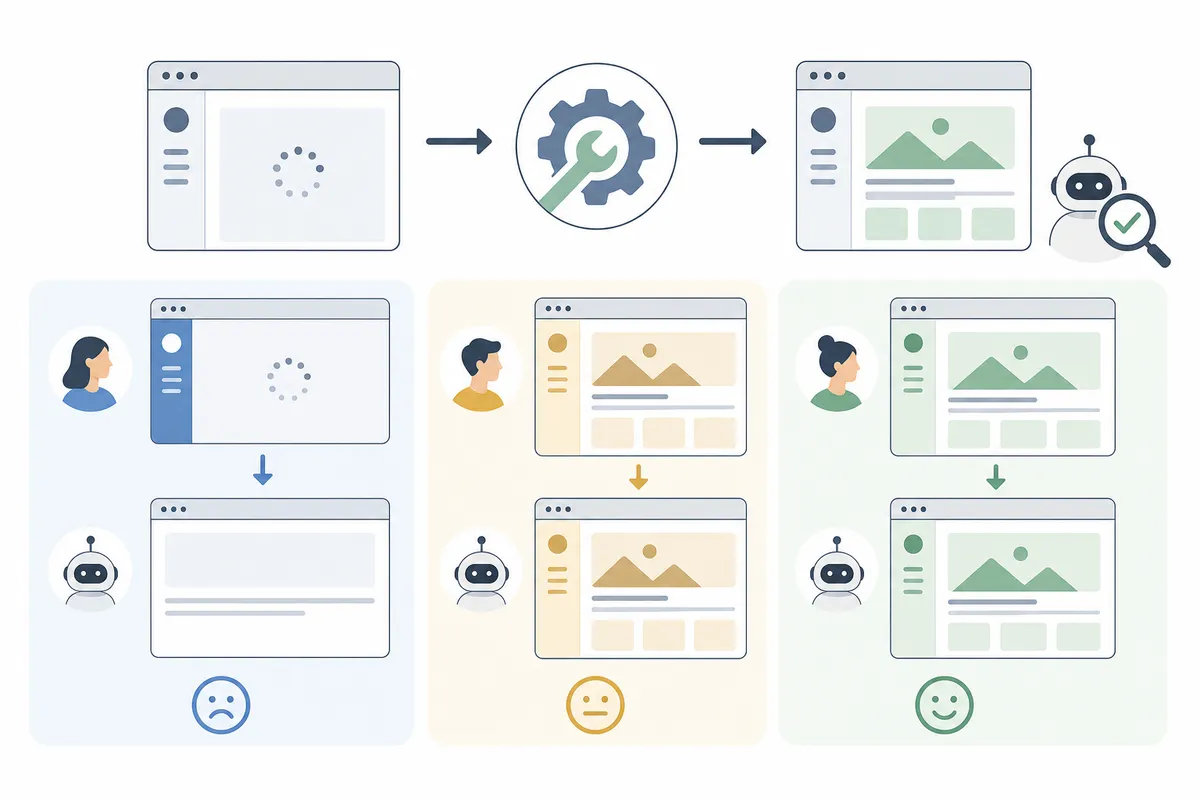
This is the part that actually fixes SEO for single page apps. Every solution below shares one idea: put real, readable HTML in front of the crawler on the first request instead of after JavaScript executes.
| Rendering strategy | What happens | Crawlability | Best for |
|---|---|---|---|
| Client-side rendering (CSR) | Browser builds the full page from JS after load | Weakest: content may be missed or delayed | Logged-in tools, dashboards not meant to rank |
| Server-side rendering (SSR) | Server renders full HTML per request, then hydrates with JS | Strong: crawler gets complete HTML immediately | Pages with frequently changing or personalized content |
| Static site generation (SSG) | HTML is pre-built at deploy time for every route | Strongest: fast, fully formed HTML every time | Blogs, marketing pages, documentation, content that changes on a schedule |
| Prerendering | A headless browser renders the SPA once, serves cached HTML to crawlers (or everyone) | Strong: effective fallback for existing SPAs | Retrofitting SEO onto an app you can't fully rebuild |
| Hybrid / Incremental Static Regeneration | Mix of SSG, SSR and on-demand rendering per route | Strong and flexible | Large sites with both static and dynamic sections |
Server-side rendering as the primary fix
SSR renders your React, Vue or Angular components into complete HTML on the server and sends it to the browser, which "hydrates" it into an interactive app. The crawler gets real content on the first request with no second rendering pass. Frameworks built around this pattern, such as Next.js for React, exist to make SSR and static generation the default. If you're on or evaluating Next.js, our Next.js SEO guide walks through metadata, sitemap and robots configuration in the order that matters.
Prerendering as a faster, cheaper retrofit
If a full SSR rebuild isn't realistic right now, prerendering is the practical middle ground. A service renders your SPA once with a headless browser and caches the static HTML. It serves that version to crawlers, and often to all first-time visitors, while the interactive JavaScript version loads for returning users. It is less elegant than true SSR but closes the crawlability gap without a framework migration.
Progressive enhancement as a safety net
Progressive enhancement means building the core experience to work without JavaScript first, then layering interactivity on top for browsers and crawlers that support it. Feature detection, which checks whether a capability exists before relying on it, keeps the page functional even if a script fails to load or a crawler doesn't fully execute it. It doesn't replace SSR or prerendering on a content-heavy site, but it is a sound defensive habit for any JavaScript-dependent feature.
A step-by-step SPA-to-SSR migration example
Rendering strategies in the abstract don't tell you how long a migration takes or in what order the work happens. Here is a walkthrough of how a typical mid-size SPA, say a 400-page SaaS directory built in React with client-side routing, moves to Next.js SSR without a full rewrite.
Step 1: audit what Google currently sees (1-3 days). Pull every indexed URL from Search Console's Page Indexing report and compare it against your actual route list. A site with 400 real views might find only 60 or 70 indexed, with the rest sitting in "Discovered, currently not indexed" or "Crawled, currently not indexed." That gap is your baseline.
Step 2: set up Next.js alongside the existing app (1-2 weeks). Rather than rewriting every component at once, most teams run Next.js as a shell around existing React components. They convert routes to Next.js pages (or app-router segments) one template at a time, and they start with the highest-traffic pages.
Step 3: move data fetching into server-side loaders (1-2 weeks, in parallel with Step 2). Any useEffect call that fetches the data a page needs to render has to move into a server-side function (getServerSideProps, a route handler or a server component's own fetch) so the HTML arrives complete on the first request.
Step 4: redirect the old hash-based or query-string URLs (1-2 days). Every old #/product/42-style address needs a server-side 301 to its new clean path, /product/42. Skipping this is the most common reason migrations lose existing rankings instead of improving them, because the old URLs disappear with nothing pointing search engines to the replacement.
Step 5: resubmit the sitemap and request indexing on priority URLs (1 day, then wait). Send a new or updated XML sitemap listing every clean route to Search Console right after each batch of pages ships. Google Search Central's own documentation notes that resubmitting a sitemap speeds up discovery but doesn't guarantee faster rendering or ranking, since crawl priority still depends on the site's existing authority and crawl budget.
Step 6: monitor the indexing curve for 4-8 weeks. Teams that track this closely typically see the "Discovered, currently not indexed" count drop steadily over several weeks as Google re-crawls converted templates. A page converted in week one might not show its new indexed status until week three or four.
Running all six steps template by template, rather than attempting one big-bang rewrite, keeps a migration from tanking existing rankings while the work is in progress.
A rough cost estimate: for a team already comfortable with React, converting a mid-size SPA (a few hundred routes) to Next.js SSR typically runs four to eight weeks of focused engineering time, based on migration case studies published by Vercel's own customer engineering team. Most of that goes to Step 3 rather than to routing or configuration, so budget accordingly instead of promising stakeholders a two-week turnaround.
Common mistakes teams make mid-migration
Even with the right rendering strategy, a handful of avoidable mistakes account for most stalled or failed SPA migrations.
Forgetting to redirect old hash URLs. It is covered above but common enough to list again: if #/shoes/running doesn't 301 to /shoes/running, backlinks and rankings pointing at the old address go to a dead end instead of transferring to the new URL.
Shipping SSR for the shell while still lazy-loading the content that matters. A page can return fully formed HTML for its header, footer and navigation while the product description or article body still loads through a client-side fetch after hydration. To a crawler that is barely better than the original problem, since the content that would rank still isn't in the initial response.
Breaking canonical tags during the transition. Most migrations run old and new URL patterns side by side for a while, which creates duplicate-content risk if both stay crawlable without a canonical tag pointing at the one you want indexed. Decide which URL wins before both go live.
Treating the migration as finished once the HTML looks right in a browser. Viewing the rendered page yourself doesn't confirm what Googlebot received. Use Search Console's URL Inspection tool, or an HTTP request with JavaScript disabled, to see the actual first-response HTML instead of the DOM after your browser has executed everything.
Underestimating how long re-indexing takes on a large site. A ten-page migration might fully show up in Search Console within a week, while a 5,000-page catalog can take two to three months to cycle through because Google re-crawls and re-renders pages in batches. Planning a launch announcement or reporting deadline around a faster timeline is a common source of false alarms when rankings don't move in week one.
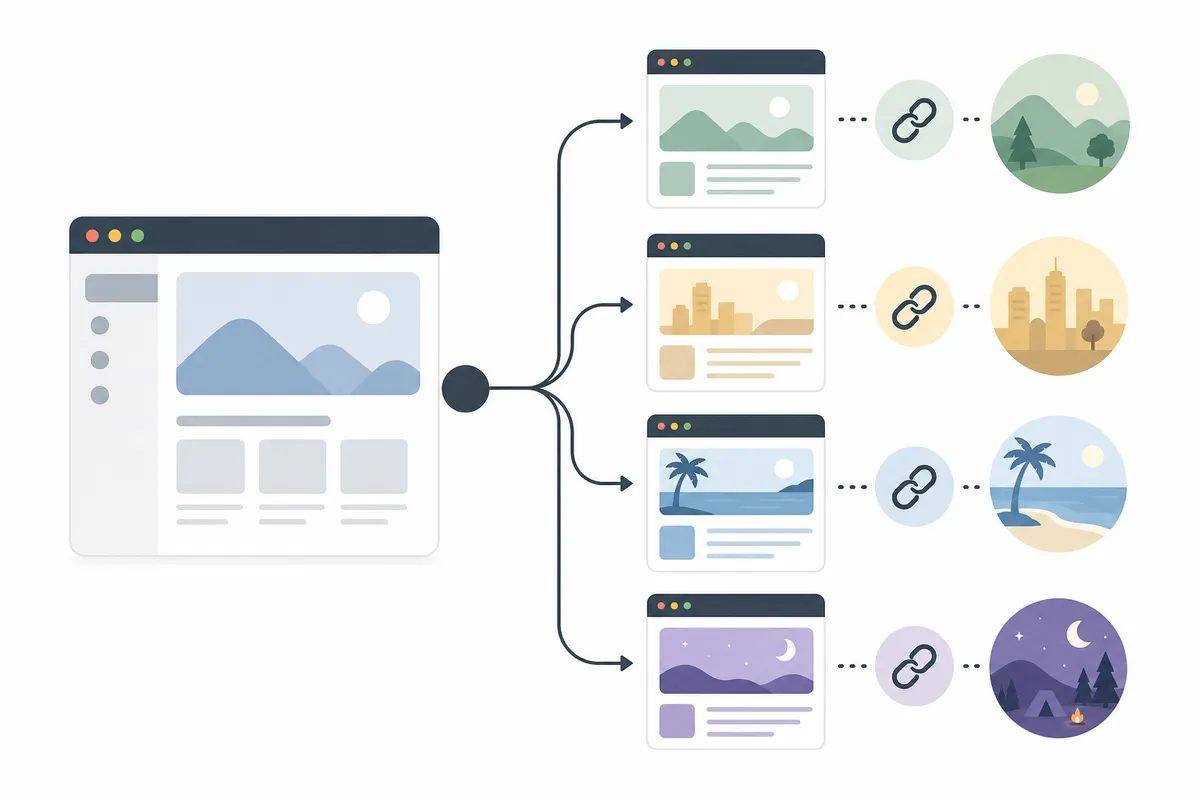
Give every view its own URL
A page without its own URL can't rank for anything, however good the content is. This is the most common structural mistake in SPA SEO, and also the most fixable.
History API vs. hash-based routing
Older SPAs often used hash-based routing, with URLs like example.com/#/shoes/running, because the part after the # could change without triggering a full page reload. The catch is that search engines have historically treated everything after a # as part of the same document.
The fix is the browser's History API, specifically pushState() and replaceState(). They let your JavaScript update the URL to a clean, real path such as example.com/shoes/running without a full reload. Search engines, and users who bookmark or share the link, get a distinct, crawlable address for that exact view.
A checklist for routing that search engines can use:
- Every distinct piece of content gets its own real path instead of a hash fragment.
- URLs are descriptive and stable:
/shoes/runningrather than/view?id=4471. - Each URL returns the correct content directly when a user or bot loads it fresh, without depending on client-side navigation history.
- A proper XML sitemap lists every one of these routes, including those below the root.
- Canonical tags point to the clean URL version of each view, so parameterized and clean paths don't send competing signals.
Metadata and structured data that update per view

A single-page app's biggest silent failure is metadata that never changes. If your <title> tag and meta description are hard-coded into the one HTML shell, every "page" of your SPA shares the same title and description in search results, which looks to Google like duplicate content.
Titles and descriptions must change with the view
Every route needs its own title tag and meta description, updated as the user (or Googlebot) navigates to that view. In practice you manage document head tags through your framework's routing layer instead of setting them once in a static index.html. Our practical guide to on-page SEO covers how to write titles and descriptions that earn clicks once they are unique per page, and the on-page SEO feature overview shows what that looks like audited across an entire site at once.
Metadata is one of the clearest signals you control directly, and a mistake at the template level multiplies across every view in your app. For the broader reasoning, see the real importance of metadata for SEO. For the tags that search engines use versus the ones they quietly ignore, read our piece on SEO meta tags Google actually uses before you build the template logic.
Open Graph and social previews
The same problem hits Open Graph tags, which control how a link looks when shared on social platforms or messaging apps. If those tags are static, every shared link from your SPA shows the same title, description and image, whichever product or article someone shared. Update og:title, og:description and og:image per route the same way you update your title tag.
Structured data needs the same per-view treatment
JSON-LD structured data, the markup that can earn rich snippets such as star ratings, FAQ dropdowns or product pricing in search results, has to be generated per view instead of injected once globally. A product-page SPA, for example, needs Product schema that reflects that product's price and availability rather than one generic block repeated everywhere.
Schema.org defines the vocabulary for this markup. Broken or missing schema forfeits a visibility opportunity your HTML-only competitors are already claiming. Our schema markup explainer walks through what each schema type does for rankings, and the schema markup audit tool checks your JSON-LD and gives you corrected markup you can paste into your templates.
Avoiding soft 404s and other indexing traps

A soft 404 happens when a page returns a normal "200 OK" status but its content looks empty, broken or like an error page to Google. SPAs are especially prone to this because a route that fails to load its data may still render a mostly blank shell. Google reads that as a bad page even though your server never returned an error.
Common SPA-specific indexing traps:
- Empty states served with a 200 status. If a product is out of stock or discontinued, or a route doesn't resolve, serve an accurate status code or clear, crawlable content instead of a blank div with a success status.
- Infinite scroll with no paginated fallback. If content only appears after a scroll-triggered JavaScript event, a crawler that doesn't scroll may never see it. Underneath the scroll, provide real paginated URLs that link to each other.
- Client-side redirects instead of server-side ones. A redirect handled in JavaScript after the page loads is slower and less reliable for crawlers than an HTTP 301 from the server.
- Robots meta tags left on
noindexfrom staging. A<meta name="robots" content="noindex">tag used during development can easily ship to production inside a shared template. - Blocked JavaScript or API endpoints in
robots.txt. If the scripts or data endpoints your SPA depends on are disallowed for crawling, Googlebot can't render the page correctly even when it tries.
Our guide to technical SEO fixes that actually move rankings covers how to audit for issues like these across a full site. That matters more on an SPA than on almost any other architecture, since one templating mistake can silently affect every route at once.
Tracking and analytics blind spots in SPAs

Analytics tools built for traditional websites assume a new pageview fires whenever the server sends a new document. SPAs break that assumption because navigating between views triggers no fresh page load. JavaScript handles it all inside one continuous session.
In practice, without extra configuration your analytics tool may log only one pageview per visit, no matter how many pages the visitor browsed. That understates engagement badly and makes it impossible to tell which views are working.
The fix is to fire a virtual pageview event every time your router changes the URL, tied to the History API update discussed earlier. Modern analytics platforms support this through enhanced measurement settings and tag management configuration, but it has to be set up deliberately. Once routing and tracking both fire correctly, rank tracking and traffic reporting across Google Analytics, Search Console, and AI referral sources become meaningful, because the underlying pageview data is accurate.
A framework-by-framework starting point
The dominant SPA frameworks all have a mature path to solving these SEO problems, though the starting point differs.
| Framework | Rendering option for SEO | What it's known for |
|---|---|---|
| React (via Next.js) | Built-in SSR, static generation and incremental regeneration | Largest community, most common choice for SEO-focused SPA rebuilds |
| Vue (via Nuxt) | Server-side and edge rendering built into the framework | Lightweight, popular for teams wanting SSR without React's overhead |
| Angular (via Angular Universal) | Official SSR add-on for existing Angular apps | Common in enterprise apps retrofitting SEO onto an existing codebase |
| Svelte (via SvelteKit) | SSR and static generation by default | Smaller bundle sizes and growing adoption for performance-sensitive sites |

The pattern is the same across all of them. If you have the choice, pick the framework's official rendering layer over a separate prerendering service. It takes more work up front and is less fragile over the long run.
Your SPA SEO audit checklist

Before you assume your SPA has an SEO problem, or declare one fixed, run through this list. This single-page app SEO guide is worth bookmarking as a reference, since most teams fix these items in stages.
- View your page with JavaScript disabled. If the content disappears, so does Google's first-pass view of it.
- Check Google Search Console's URL Inspection tool for a handful of key pages and compare the rendered HTML to what you expect.
- Confirm every important view has a unique, crawlable URL, with no hash fragment or query-string-only identifier.
- Verify titles and meta descriptions change per route and aren't limited to the homepage.
- Check that your XML sitemap lists every indexable route and is referenced correctly in
robots.txt. - Test your structured data per template using Google's Rich Results guidance, on more than one sample page.
- Confirm analytics fires a virtual pageview on every route change as well as on the initial load.
- Look for soft 404s in Search Console's indexing report. Empty states served with a 200 status are the usual cause.
- Benchmark Core Web Vitals. web.dev sets the current thresholds at roughly 2.5 seconds for Largest Contentful Paint, 200 milliseconds for Interaction to Next Paint and 0.1 for Cumulative Layout Shift. SPAs tend to do well here once rendering is fixed, since the underlying interactivity is already fast.
Running this checklist by hand across a large site is slow, and it is easy to miss one template that affects hundreds of pages. A sample SEO report shows what a full automated pass across crawlability, metadata and schema looks like without the manual spreadsheet work.
FAQs
Can a single-page app rank on Google at all?
Yes. Google can crawl and index JavaScript-rendered content, provided the content appears in rendered HTML, each view has its own URL and metadata updates per view. An unmodified client-side-rendered SPA with no server-side rendering is the version that struggles to rank.
Is React bad for SEO?
No, React itself isn't the problem. A plain client-side-rendered React app without server-side rendering is harder to get indexed well, and Next.js or another framework that supports server-side rendering or static generation solves most of the SEO issues people associate with React.
What's the difference between SSR and prerendering for SEO?
Server-side rendering builds fresh HTML on every request, which handles personalized or frequently changing content well. Prerendering renders the page once in advance and serves a cached static version. It is faster to implement but less suited to content that changes per visitor or per request.
Why does my SPA show a blank page in Google's cache or URL Inspection tool?
This usually means Googlebot hasn't rendered the page yet, or the JavaScript failed to execute correctly during rendering. Often the required scripts or API calls were blocked, timed out or depended on something unavailable in Google's rendering environment. Check your robots.txt for blocked resources and test the live page with URL Inspection in Search Console.
Do single-page apps need separate URLs for every page, or is one URL enough?
Separate URLs. A search engine can only index and rank an individual URL, so if your entire SPA lives at one address, Google has one entry to work with no matter how much content sits behind client-side navigation. Use the History API to give every meaningful view its own real, crawlable path.
Get your SPA's SEO fixed in the right order

Fixing SEO for single page apps usually takes several changes: rendering, routing, metadata and schema, tackled in that order on the templates that touch the most pages. Start with the view that would move the most traffic if it started ranking tomorrow, then work outward. If you want a prioritized list of what to fix on your own site first, talk to the team and get a sample SEO report built from your actual pages.
Resources / References
Related reading: JavaScript SEO: Why Your Pages Go Invisible to Google.
Sources
- What is a Single Page Application? SPA vs MPA 2025
- How single page applications work and when to use them
- How do you optimize a large SPA (single page application) ...
- When to consider Single Page Applications?
Disclaimer: This article is general health information, not individual medical advice. It cannot account for your history, medication or examination findings. For advice about your own symptoms, speak to a qualified clinician; if symptoms are severe or worsening, seek urgent care.
About the author
SearchBlueprint researched, wrote and scored this article with the content pipeline our customers run on their own sites. The score in the byline is what our content engine gave this page before it published. Nothing here is reviewed by hand, which is the point: it is the product's output, published where anyone can check it.