Web Accessibility and SEO: Why Fixing One Boosts the Other
SearchBlueprint · · 11 min read · scored 90/100

Web accessibility and SEO rest on the same technical foundation: clean semantic HTML, descriptive text, and a page structure that works without a mouse or clear vision. Fixing accessibility barriers, like missing alt text, broken heading order, or low contrast, solves crawlability problems too, which is why accessibility audits often move rankings alongside compliance scores.
What Web Accessibility and SEO Actually Share
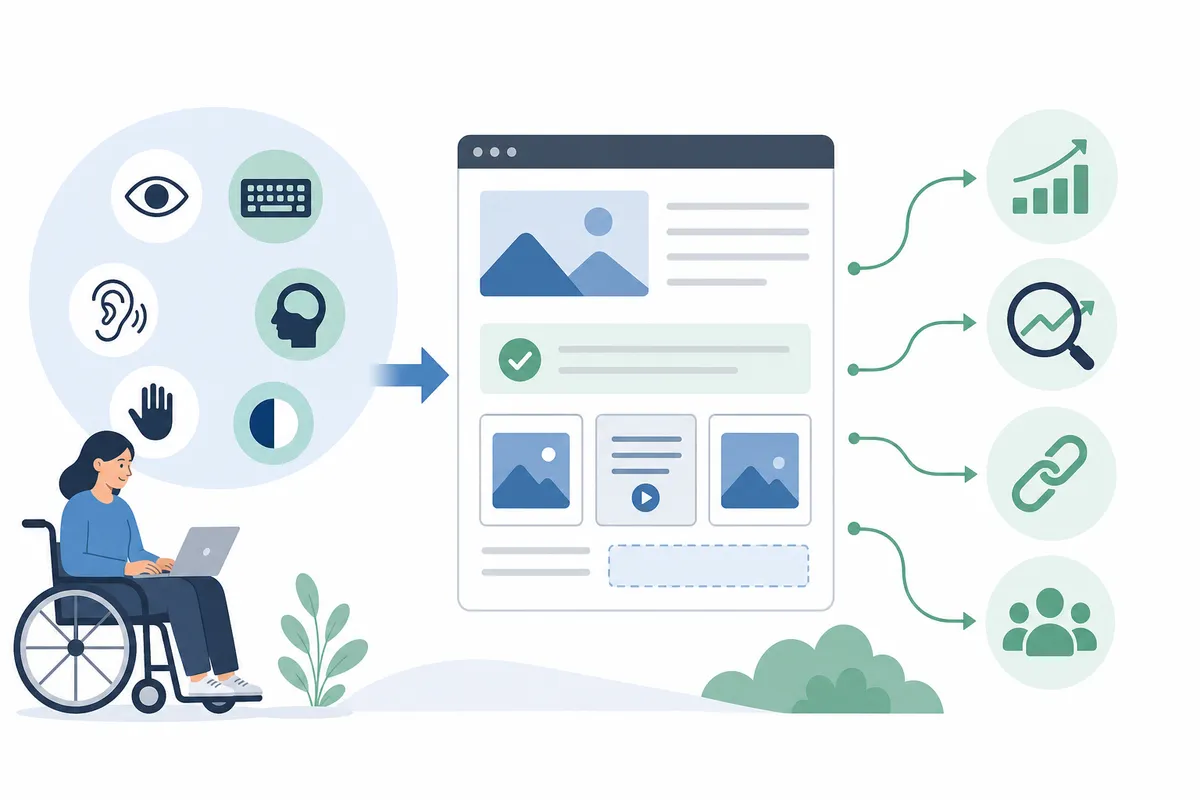
Search engines and screen readers face a similar problem: neither one sees a page the way a sighted visitor does. A screen reader converts markup into speech. A crawler converts markup into an index entry. Both depend on the same signals: heading order, alt text, link labels, and a page structure that still makes sense without visual styling.
The Web Content Accessibility Guidelines (WCAG), maintained by the World Wide Web Consortium since 1999, organize this around four principles: content must be perceivable, operable, understandable, and robust. A perceivable page offers text alternatives for non-text content. An operable one works with a keyboard alone. An understandable one uses predictable navigation and plain language. A robust one renders correctly across browsers and assistive tools, present and future. Every one of those principles maps to a page quality Google already rewards: clear structure, readable content, and a working experience regardless of device.
This overlap is not a coincidence or a workaround. Accessibility specialists have noted that black-hat SEO tricks, like keyword-stuffed alt text, have mostly disappeared over the past decade, while accessibility requirements have stayed largely the same. The tactics that used to game search results were often the ones that broke accessibility first.
For the criteria and conformance levels behind every recommendation in this guide, the W3C's Web Content Accessibility Guidelines are the primary reference.

What Fixing Accessibility Does to Your Traffic
The traffic case for web accessibility and SEO working together is not theoretical. Two widely cited reviews looked at real sites before and after accessibility changes and found consistent gains. Neither one proves accessibility alone caused the increase, since both are correlational rather than controlled experiments, but the direction is consistent: more accessible sites tend to see more organic traffic, not less.
| Study | Sites Reviewed | Traffic Change Reported | Other Findings |
|---|---|---|---|
| Semrush, AccessibilityChecker.org, and BuiltWith.com combined study | Nearly 850 sites | 73% saw increased organic traffic about three months after implementing accessibility fixes, with average gains near 12% | Traffic gains tracked closely with accessibility score improvements |
| Semrush review of accessibility scores across websites | 10,000 sites | 23% higher organic traffic for more accessible sites | 27% more ranking keywords and a 19% stronger Authority Score than less accessible sites |

Both reviewers frame the relationship the same way: accessibility fixes correlate with stronger organic performance. That matters when you're deciding where to spend a limited SEO budget. A missing skip-navigation link won't tank your rankings by itself, but the underlying pattern, thin heading structure, missing alt text, unlabeled forms, usually shows up on a technical SEO audit too.
Where Accessibility Fixes Move SEO Metrics
Not every accessibility requirement affects search visibility equally. The table below maps the fixes with the clearest SEO payoff to the WCAG principle behind them, so you can prioritize changes search engines can actually detect.
| Accessibility Fix | WCAG Principle | SEO Benefit | Where It Shows Up |
|---|---|---|---|
| Descriptive alt text on meaningful images | Perceivable | Helps images rank in Google Image Search and clarifies page topic for crawlers | Image search, on-page relevance signals |
| Logical heading order (one H1, nested H2/H3) | Perceivable, Understandable | Lets Google identify page structure and generate accurate snippets | Search snippets, jump-to-section links |
| Descriptive link and anchor text | Understandable | Gives crawlers context about the linked page instead of a generic "click here" | Internal linking, link equity flow |
| Keyboard-operable navigation and forms | Operable | Reduces bounce from users who can't complete key actions, a behavioral signal | Core Web Vitals, engagement metrics |
| Captions and transcripts for video or audio | Perceivable | Makes non-text content crawlable and indexable as text | Video and podcast indexing |
| Sufficient color contrast and readable font size | Perceivable | Improves readability tied to dwell time and lower bounce | Page experience, mobile usability |
Alt Text: The Clearest Overlap
Alt text is the single clearest place accessibility and SEO overlap. Screen readers read it aloud so a visually impaired visitor knows what an image shows. Google uses the same text to understand what the image contains, since it can't see pixels the way you do. Skip alt text on a product photo and you lose both audiences at once.
The rule is simple: describe what the image actually shows, keep it concise so screen readers don't cut it off mid-sentence, and leave the alt attribute empty (alt="") on purely decorative images so screen readers skip past them instead of announcing clutter. For a closer look at what good and bad alt text actually looks like side by side, see this guide to writing alt text that works for both screen readers and search engines.
Image file size matters here too. A page full of unoptimized images loads slowly for everyone, and slow pages hurt both usability and Core Web Vitals. This step-by-step guide to optimizing images for SEO covers compression and format choices that keep pages fast without sacrificing image quality.
Heading Structure and Page Titles
Headings do two jobs at once. For a screen reader user, they work like a table of contents. Jumping from heading to heading lets someone skip straight to the section they need instead of listening to an entire page read aloud. For Google, headings signal what each section covers, which is part of how snippets and jump links get generated.
Keep one H1 per page, and nest H2s and H3s in order without skipping levels. A page that jumps from an H2 straight to an H4 confuses both a screen reader's navigation menu and Google's understanding of your content hierarchy.
Title tags matter just as much. WCAG guidance calls for a title that clearly identifies the page, since it's often the first thing a screen reader announces. Google uses the same tag to generate the blue link in search results, and it rewards a title that stays specific instead of vague. You can check how your current title tags and headings actually render with a free meta tag checker before you publish changes.
Link Text, Contrast, and Keyboard Access
Three smaller fixes round out the highest-impact list. Descriptive link text ("download the accessibility guide") gives both a screen reader user and a crawler more context than "click here" ever will. Sufficient color contrast between text and background keeps content readable for users with low vision, and it also keeps your Lighthouse accessibility score, one of the scores Chrome's own auditing tool reports, from dragging down your overall page quality signal. See how these scores are actually computed in Chrome for Developers' Lighthouse documentation. Keyboard-operable navigation, meaning every link, button, and form field works without a mouse, protects users with motor impairments and prevents the kind of broken interaction that shows up as poor engagement in page experience signals.
JavaScript, ARIA, and the Misconceptions Slowing Teams Down

Two misconceptions cause more damage than any single missing alt tag.
The first is assuming a JavaScript-rendered page is invisible to screen readers and search engines by default. Modern browsers and modern crawlers both execute JavaScript, so content that renders client-side isn't automatically hidden from either. The real risk is timing and fallback: a component that never finishes rendering because of a script error leaves a screen reader with nothing to announce and a crawler with nothing to index. Test what actually loads on the page, not what the code is supposed to do.
The second is treating ARIA attributes as a universal fix. ARIA (Accessible Rich Internet Applications) labels can patch a custom widget that plain HTML can't describe on its own, but they don't replace semantic markup. A <div> styled to look like a button and given role="button" still needs keyboard event handling built by hand, something a native <button> element gets automatically. Overusing ARIA on elements that already have a native semantic equivalent tends to confuse assistive technology more than it helps, and it does nothing for SEO that proper HTML tags don't already provide.
One accessibility technique worth knowing: moving supplementary content off-screen with CSS, rather than hiding it entirely, is a legitimate way to serve screen reader users extra context without cluttering the visual layout. Used honestly, it doesn't hurt rankings. Used to stuff keywords nobody will see, it's exactly the kind of manipulation search engines are built to catch.
Build an Accessibility-SEO Workflow You Can Actually Keep Using
Treat accessibility as one lane inside your regular SEO process, not a separate project that happens once and gets forgotten.
- Audit before you fix anything. Run a full technical pass first so you know which issues are structural (missing headings, broken alt text) versus cosmetic. This 25-check website audit checklist is a reasonable starting point if you've never run one yourself.
- Fix the shared issues first. Alt text, heading order, title tags, and link text touch both accessibility and SEO scores. Fixing these first gets you the fastest combined return.
- Build the checks into your publishing process, not just your audit process. A 27-point on-page SEO checklist run before every page goes live catches heading and alt text problems before they ship, instead of finding them months later.
- Re-audit on a schedule. Sites drift. A new template, a redesigned form, or a new content editor can reintroduce issues you already fixed. A broader 46-point SEO checklist covers the full technical picture beyond accessibility alone, so you're not re-deriving your process every quarter.
- Keep a record of what changed and when. If traffic moves after an accessibility fix, you want to know which change caused it, not guess later.
The order matters. Fixing accessibility issues without confirming they resolved the related SEO issue, or the reverse, means redoing the work twice. A complete SEO audit checklist run in the right order keeps the two workstreams from working against each other.
Can You Fix This Yourself, or Do You Need a Specialist?
Most of what's in this article, alt text, heading order, link text, title tags, is well within reach for anyone who can edit a CMS. None of it requires a developer, and none of it requires an accessibility consultant.
Where DIY reaches its limit is anything involving custom interactive components: multi-step forms, date pickers, modal dialogs, carousels, or anything built with heavy client-side JavaScript. Making those keyboard-operable and screen-reader-friendly usually needs someone who understands ARIA patterns and has actually tested with a screen reader, not just a browser extension that flags missing attributes.
A practical middle path: run an automated scan first to catch the easy, high-volume issues, missing alt text, low contrast, empty headings, fix those yourself, then bring in a specialist only for the interactive components an automated tool can't fully evaluate. Automated scanners catch a meaningful share of WCAG issues, but not all of them; several success criteria still require a person actually navigating the page with a keyboard or a screen reader.
If you're not sure where your site currently stands, start with a free automated check rather than guessing. It won't replace a full accessibility audit, but it will tell you whether you're dealing with a handful of quick fixes or a structural problem across your templates.
Web Accessibility, ADA Compliance, and Search Rankings
Accessibility is also a legal question in the United States, separate from any SEO benefit. Courts have increasingly applied the Americans with Disabilities Act (ADA) to business websites, treating them the way they'd treat a physical storefront a wheelchair user can't enter. That exposure exists whether or not your rankings move.
Google has never confirmed a direct accessibility ranking factor, and treating accessibility purely as an SEO tactic misses the point. The honest framing is that accessibility and SEO reward the same underlying qualities, clear structure, readable content, and a working experience across devices, without either one causing the other. Google's own Search Essentials guidelines focus on crawlability, quality content, and a working page experience, all of which an accessible site tends to already satisfy.
Treat WCAG 2.1 Level AA as the practical floor. It's the standard most ADA-related settlements and most corporate accessibility policies reference, and it's thorough enough to catch nearly every SEO-relevant issue in the table above along the way.
FAQs
Does making a website accessible actually improve SEO rankings?
Google hasn't confirmed a direct accessibility ranking factor, but accessible sites and well-optimized sites rely on the same signals: clear headings, descriptive alt text, and readable structure. Reviews of real sites have found accessible sites earning more organic traffic and ranking for more keywords than less accessible competitors, even without a confirmed direct link.
What's the single highest-impact accessibility fix for SEO?
Alt text on meaningful images is usually the fastest win, since it serves screen readers and Google Image Search at the same time and is rarely implemented consistently across an entire site.
Do I need to hire an accessibility consultant to fix these issues?
Not for the basics. Alt text, heading order, descriptive link text, and title tags are editable by anyone who manages your CMS. Complex interactive components like custom forms or carousels usually need someone experienced with ARIA and actual screen reader testing.
Does using ARIA attributes help or hurt SEO?
Used correctly on custom components that genuinely need them, ARIA neither helps nor hurts SEO directly. Overusing ARIA on elements that already have a native HTML equivalent tends to create confusion for assistive technology without any SEO upside.
Is WCAG 2.1 AA enough, or should I aim for AAA?
WCAG 2.1 Level AA is the practical standard most sites, and most legal frameworks, reference. Level AAA includes stricter requirements that are difficult to apply site-wide and aren't expected for most businesses.
Check Where Your Site Actually Stands
Pick one page, ideally a high-traffic one, and run through the fixes above: alt text, heading order, link text, and contrast. Most of what moves the needle on web accessibility and SEO together takes an afternoon, not a redesign. If you want a clearer picture of where your whole site stands before you start fixing pages one at a time, look at a sample SEO report to see what a full audit actually surfaces.
Resources / References
- W3C's Web Content Accessibility Guidelines
- Chrome for Developers' Lighthouse documentation
- Search Essentials guidelines
Sources
About the author
SearchBlueprint researched, wrote and scored this article with the content pipeline our customers run on their own sites. The score in the byline is what our content engine gave this page before it published. Nothing here is reviewed by hand, which is the point: it is the product's output, published where anyone can check it.