What Is Adaptive Content Optimization? A Plain-English Guide
SearchBlueprint · · 9 min read · scored 92/100

Adaptive content optimization is the practice of updating published pages continuously, based on live signals such as ranking drops, changing search queries, shifts in the results page, and AI answer engines, rather than rewriting content on a fixed schedule. If you came here asking what is adaptive content optimization in practice, it comes down to this: the page changes when the data says it should, and stays put when it is already winning.
This guide is for anyone who owns a body of published content: in-house marketers, SEO leads, agencies, and founders who write their own blog. It explains what the adaptive loop looks like in practice, where AI genuinely helps, and how to start on a handful of pages without buying anything new.
What adaptive content optimization actually means
Search results move constantly. Competitors publish, Google reruns its tests, the way people phrase a question drifts, and AI assistants now summarize answers before anyone clicks. A page that was perfectly tuned on the day it went live slowly falls out of tune with the query it was built for.
Adaptive content optimization treats that drift as normal and builds a standing response to it. Instead of writing a page once and hoping, you watch a few signals for each important page and make small, dated edits when one of those signals moves. The craft underneath does not change. The fundamentals of what an SEO article is and why it still matters hold exactly as they did. Adaptation just decides when those fundamentals get reapplied to a page that has slipped.
How it differs from a one-time content refresh
A refresh is an event. Adaptive optimization is a habit. The difference shows up in what triggers the work, how big each change is, and whether anyone checks the outcome.
| What you compare | One-time refresh | Adaptive content optimization |
|---|---|---|
| Trigger | A calendar date, or a traffic drop big enough to alarm someone | A defined signal crossing a threshold, such as a mapped keyword leaving page one |
| Scope of each change | The whole page gets reworked at once | The smallest edit that answers the signal, often one section or a title tag |
| Cadence | Quarterly or yearly, then silence | Continuous monitoring, occasional small edits |
| Effort pattern | Large spikes of work a few times a year | A steady, low drain on the team |
| Evidence | The rewrite is rarely measured afterward | Every change is dated and compared before and after |
The signals worth watching
You do not need dozens of inputs. Five cover most of what matters:
- A keyword you mapped to the page slides out of the top ten.
- The questions people ask change. New modifiers appear, or the People Also Ask boxes rotate to phrasings your page never answers.
- A results-page feature appears or disappears: an AI Overview, a featured snippet you lost, a video pack pushing you down.
- Facts on the page go stale. A year in a heading, a price, a screenshot of an interface that no longer looks like that.
- Impressions hold steady while clicks fall. That pattern usually points at the title and meta description, not the body.
Why pages that never change lose ground
Decay is the default on competitive queries. Someone else publishes a fuller answer, search engines retest what ranks, and the language of the query itself moves on. None of that requires you to have done anything wrong.
Be honest about the flip side, though. Not every page decays. A genuinely evergreen explainer can hold its position for years, and editing it without a reason is busywork at best. Google's own guidance on creating helpful, people-first content is consistent on this point: updates should make a page more helpful, not merely newer. Changing a date while the content stays stale is the kind of move that guidance warns against.
Two newer surfaces raise the stakes for staying current. Freshness-driven feeds reward pages that reflect what is happening now, which is why Google Discover optimization behaves so differently from classic rankings. And AI Overviews answer many questions directly, so the individual passages on your page matter as much as the page as a whole.

How adaptive content optimization works in practice
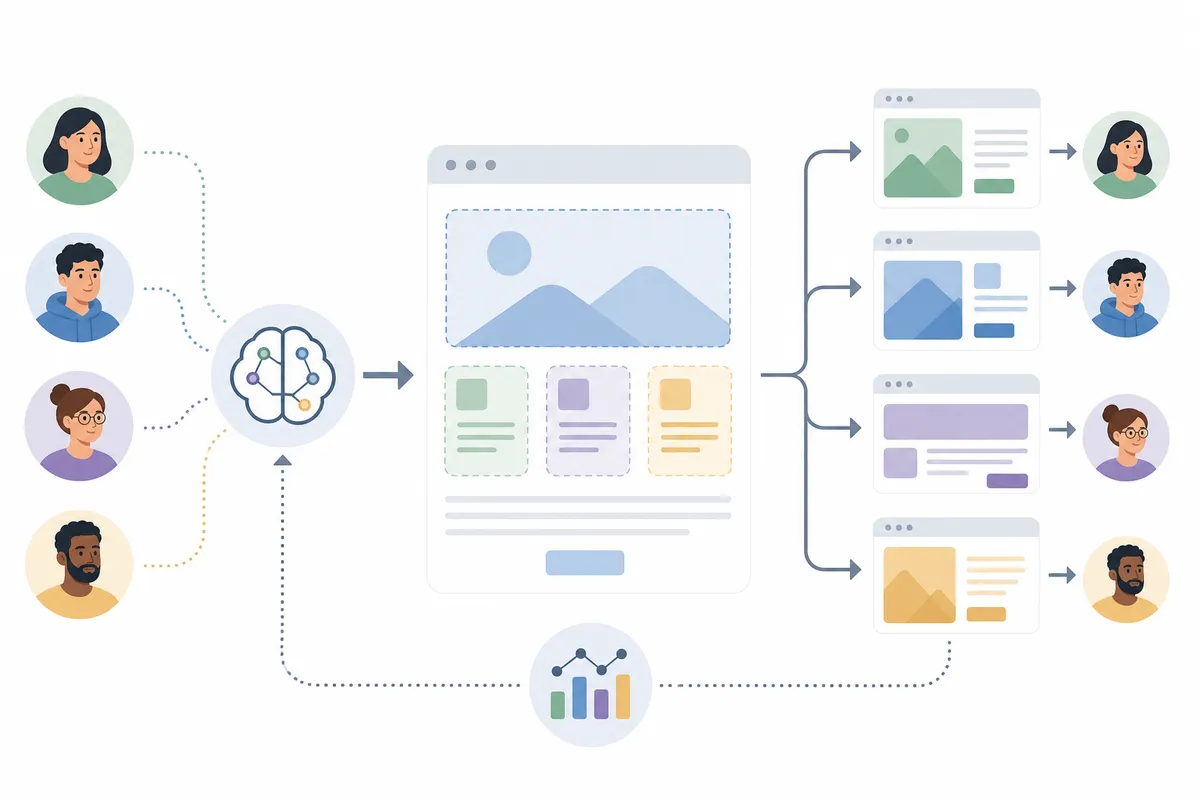
The loop has four stages. Small teams run all four in a spreadsheet. Larger teams wire parts of it into tooling. The stages stay the same either way.
Detect
Watch the signals listed above for each page you care about. Weekly rank checks, a monthly read of your Search Console queries, and an occasional look at the live results page are enough to start. The question at this stage is narrow: what changed, and on which page?
Decide
Not every movement deserves a response. Rankings wobble daily, and chasing noise burns the team out. A real trigger persists across a few checks in a row. When one does, decide the smallest edit that answers it. A lost snippet might need one reworded paragraph. A shifted query might need a new H2, not a rewrite.
Act
Make the edit on the existing URL. Update the visible date only when the content genuinely changed. Google's publication date guidance warns against refreshing a date without significantly updating the content. If you run this across many pages, the publishing step deserves its own care: the setup described in what automated content publishing actually looks like when it works includes verifying that each change is live at the URL, which catches the quiet failures where a save never reached the site.
Verify
Write down the date of the change and what you changed. Compare the weeks before and after. If the page got worse, roll the edit back. The log you build this way is the most valuable asset in the whole system, because it slowly teaches you which edits work on your site.
Where AI helps, and where people stay in charge
AI is genuinely good at the parts of this loop that involve reading a lot and noticing drift. It can scan a query report and flag phrasing your page never uses. It can compare your page against what currently ranks and name the gaps. It can draft a rewrite of one section in minutes.
What it should not do is ship unreviewed. Unreviewed machine rewrites flatten a site's voice and occasionally invent facts, and both problems compound when the loop runs weekly. Keep a person on the gate: AI proposes, a human approves, especially for prices, claims, and anything legal.
AI also changes the target you are adapting toward. Your page is no longer only competing for a blue link. It is a source that assistants quote, which rewards self-contained passages that answer one question cleanly. The full playbook for that lives in our guide to getting cited by AI answer engines, and it pairs naturally with an adaptive loop: the same monitoring that catches a lost ranking can catch an assistant answering your question with a competitor's words.

How to start without rebuilding your workflow
You can stand up a working version of this in an afternoon:
- Pick a short list of pages that actually earn something: leads, sales, sign-ups. Ten is plenty to start.
- Map each page to one primary keyword. One page, one job.
- Record a baseline for each: current position, monthly clicks, conversions, and today's date.
- Set one or two triggers per page. For example: the keyword leaves the top ten, or clicks fall while impressions hold.
- Check the signals on a short, regular loop and act only when a trigger fires. Resist editing pages that are fine.
- Log every change with its date and reason, and review the log monthly.
Can you run this yourself?
For a small site, yes, comfortably. A spreadsheet, a free Search Console account, and an hour a month cover a dozen pages, and doing it by hand first teaches you what the signals feel like. The case for tooling arrives with scale: once you are watching dozens of pages across several keywords each, manual checks get skipped, and skipped checks are how a quiet three-month decline goes unnoticed. Bring in software or outside help when the page count outgrows the hour, or when nobody on the team clearly owns the loop.
How to tell whether adaptive optimization is paying off
Judge the system change by change, not as one blended number. Each dated edit either moved its page or it did not, and both outcomes are useful.
| Metric | What it tells you | Where you see it | Sensible cadence |
|---|---|---|---|
| Position for the mapped keyword | Whether an update moved the ranking it targeted | A rank tracker, or manual checks in a private window | Weekly |
| Impressions and clicks | Whether more people see the page and choose it | Google Search Console | Monthly |
| Click-through rate on steady impressions | Whether the title and snippet earn the click | Google Search Console | Monthly |
| Presence in AI answers | Whether assistants cite the page for its question | Spot checks in the assistants your buyers actually use | Monthly |
| Conversions from the page | Whether the recovered traffic is worth anything | Your analytics | Monthly |
Expect losses. Some edits will do nothing, and a few will hurt and get rolled back. That is not the system failing. An edit that did not work rules out a theory about what the page needed, which is more than most content programs can say about their rewrites.
FAQs
What is adaptive content optimization in simple terms?
It is the habit of updating published pages when live signals say they need it, instead of on a fixed schedule. You watch rankings, search queries, and how results pages change, then make small dated edits and check whether each one helped.
How is it different from normal SEO?
It is part of SEO, not a rival to it. Classic on-page work happens once, when a page is created. Adaptive optimization is the maintenance loop that keeps that work true as queries, competitors, and AI answers change around the page.
How often should you update content?
There is no correct frequency. Update a page when a trigger fires, such as a mapped keyword leaving the top ten or the page's facts going stale. Many teams review their signals monthly and find that most pages need no edit at all in a given cycle.
Does updating old content actually help rankings?
Often, when the update makes the page more helpful or more current for its query. It is not guaranteed, and cosmetic changes such as bumping a date without changing substance tend to do nothing. Measuring each change against a dated baseline tells you what works on your site.
Do you need AI tools to do adaptive optimization?
No. A small site can run the whole loop with a spreadsheet and Google Search Console. AI earns its place at scale, where it can read query reports, flag drift, and draft revisions faster than a person, provided a person still approves what ships.
Put one page on the loop this week
Choose the page that matters most to your pipeline, write down its position, clicks, and today's date, and set one trigger that tells you when to act. That single loop will answer what is adaptive content optimization better than any further reading. If you would like to see what a full baseline looks like before you build your own, talk to the team and walk through a sample SEO report to see what gets captured for every page.
Related reading: Adaptive Content Strategy: Stop Losing Readers to Generic Pages.
Resources / References
About the author
SearchBlueprint researched, wrote and scored this article with the content pipeline our customers run on their own sites. The score in the byline is what our content engine gave this page before it published. Nothing here is reviewed by hand, which is the point: it is the product's output, published where anyone can check it.