What Is Search Engine Indexing & How Does It Work (and Why Pages Get Skipped)
By Toy Wen Da, Co-Founder · Updated · 21 min read · scored 95/100
What is search engine indexing & how does it work? It's the process a search engine uses to scan a page, store its content in a searchable database, and decide whether the page is eligible to appear in results. Without indexing, a page doesn't exist to Google or Bing, no matter how good it is.

If you've published a page and wondered why it never shows up on Google, the answer almost always traces back to this step. Crawling finds a page, indexing decides whether to keep it, and ranking decides where it lands once it's in. Miss the middle step and nothing else matters.
You can nail your keyword research and write a genuinely useful article, then get zero traffic because the page never made it into the index. The problem there isn't ranking but indexing, and it needs a different fix.
What is search engine indexing?
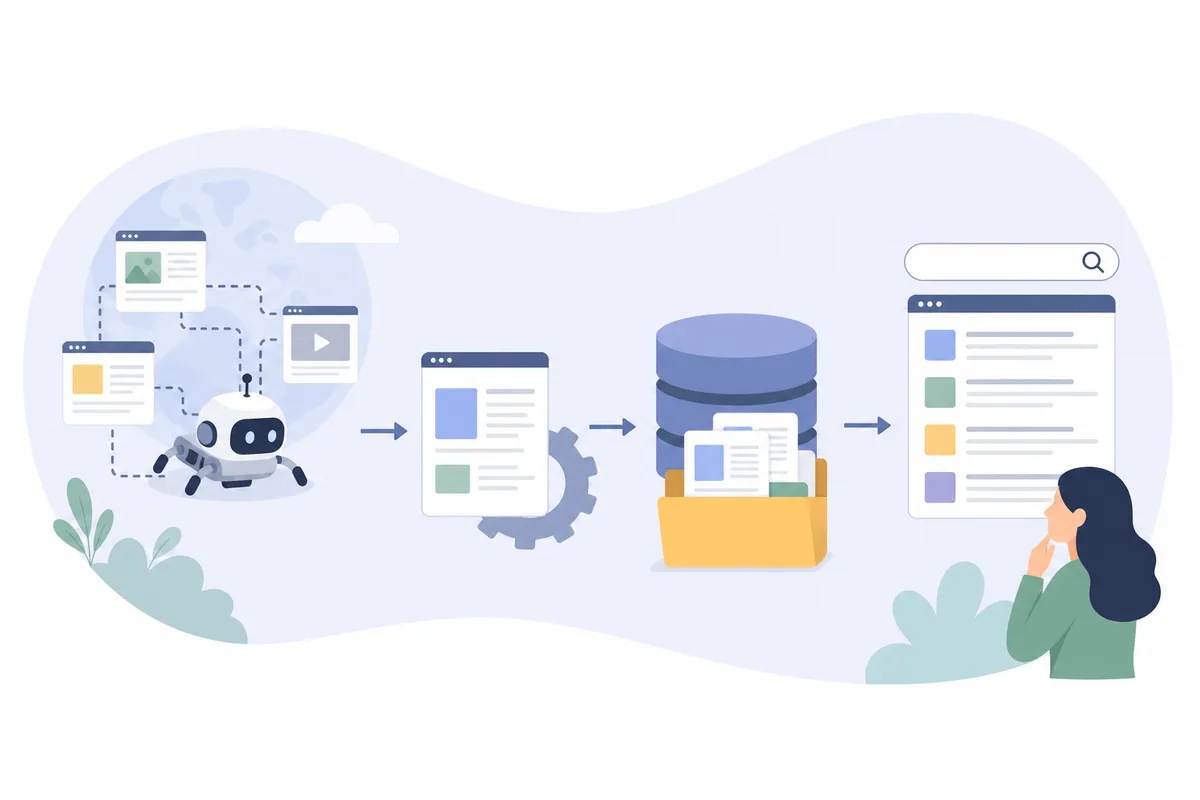
Search engine indexing is the process by which a search engine analyzes a web page's content and adds it to its index, a searchable database of pages it considers eligible to appear in results. It's the second of three stages a page goes through before it can rank: crawling, indexing and ranking.
Think of a library. Crawling is the librarian walking the shelves and noting which books exist. Indexing is cataloging each book by subject, author and keyword so it can be found again in seconds. Ranking is deciding which book gets handed to a particular reader first.
Getting indexed doesn't guarantee traffic; it just means you're in the game. A page has to be indexed before it can rank for anything, which is why this step sits underneath nearly every other SEO decision you'll make, including the on-page and technical choices covered in the fundamentals of SEO.
How does search engine indexing work?
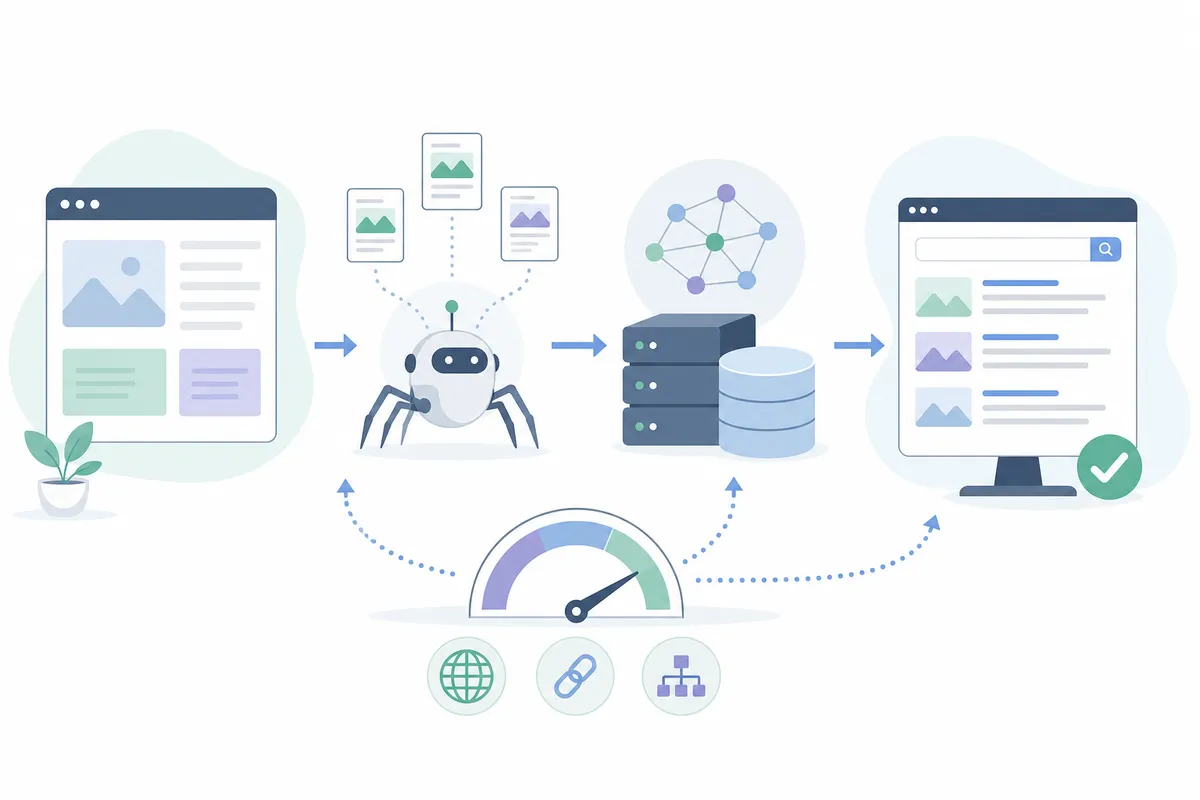
Indexing works in a sequence. A crawler finds the page, the search engine renders and analyzes it, and then it decides whether the page earns a spot in the index.
Step 1: Crawling finds the page
Before anything can be indexed, it has to be discovered. Search engines use automated programs, often called crawlers, bots or spiders, that follow links from page to page across the web. Googlebot and Bingbot both work this way.
A crawler reaches your page either through a link from a page it already knows, or because you submitted the URL through a sitemap or a tool like Google Search Console. New pages with no inbound links and no sitemap entry can sit undiscovered indefinitely.
Step 2: Rendering and analysis
Once a crawler lands on a page, the search engine renders it much like a browser would, loading the HTML, CSS and JavaScript to see the finished page. According to Google Search Central, Google's systems render the page content and take note of important signals, from keywords to freshness, before deciding what to do with it.
During this step the engine reads the page's text, title tag, headings, image alt text, internal links and structured data. It also checks for duplicate content, thin content and technical signals like canonical tags. Metadata quality starts to matter here, and the signals covered in the real importance of metadata for SEO feed directly into how a search engine classifies the page.
Step 3: Indexing stores what matters
If the search engine decides the page has enough unique value, it stores the page's URL and content signals in the index. This is the indexing step itself: the content is now part of the searchable database.
At this stage Google also works out canonicalization. If several URLs show near-identical content, Google groups them and picks one canonical version to represent the group in results. The others are kept as alternates but typically won't show up independently.
Step 4: Ranking decides what shows up
Being indexed doesn't mean a page appears for every relevant query. Ranking is the separate, ongoing process of scoring indexed pages against a specific search query and ordering them in the results. A page can sit in the index for months without reaching page one for its target keyword.

Crawling vs. indexing vs. ranking: why the distinction matters
People use these three words interchangeably in casual conversation, but they're different processes with different failure points. A page that's "crawled" has simply been visited. A page that's "indexed" has been stored and judged worth keeping, and a page that's "ranking" is competing for a specific query.
| Stage | What Happens | Who/What Performs It | What a Failure Looks Like |
|---|---|---|---|
| Crawling | Bot discovers and visits the URL | Googlebot, Bingbot, or other crawlers | URL never visited; no links or sitemap entry pointing to it |
| Indexing | Content is analyzed and stored in the index | Search engine's indexing systems | Page crawled, but marked "Crawled – currently not indexed" |
| Ranking | Indexed pages are scored and ordered for a query | Ranking algorithm, applied per search | Page indexed but buries on page 5+ for its target keyword |
A page can be crawled without being indexed. It's much rarer, but a page can even be indexed without having been fully crawled recently, if Google already has older data on it. Keeping the stages separate makes diagnosis far easier, because "it's not ranking" and "it's not indexed" stop looking like the same bug.
What is a search engine index?
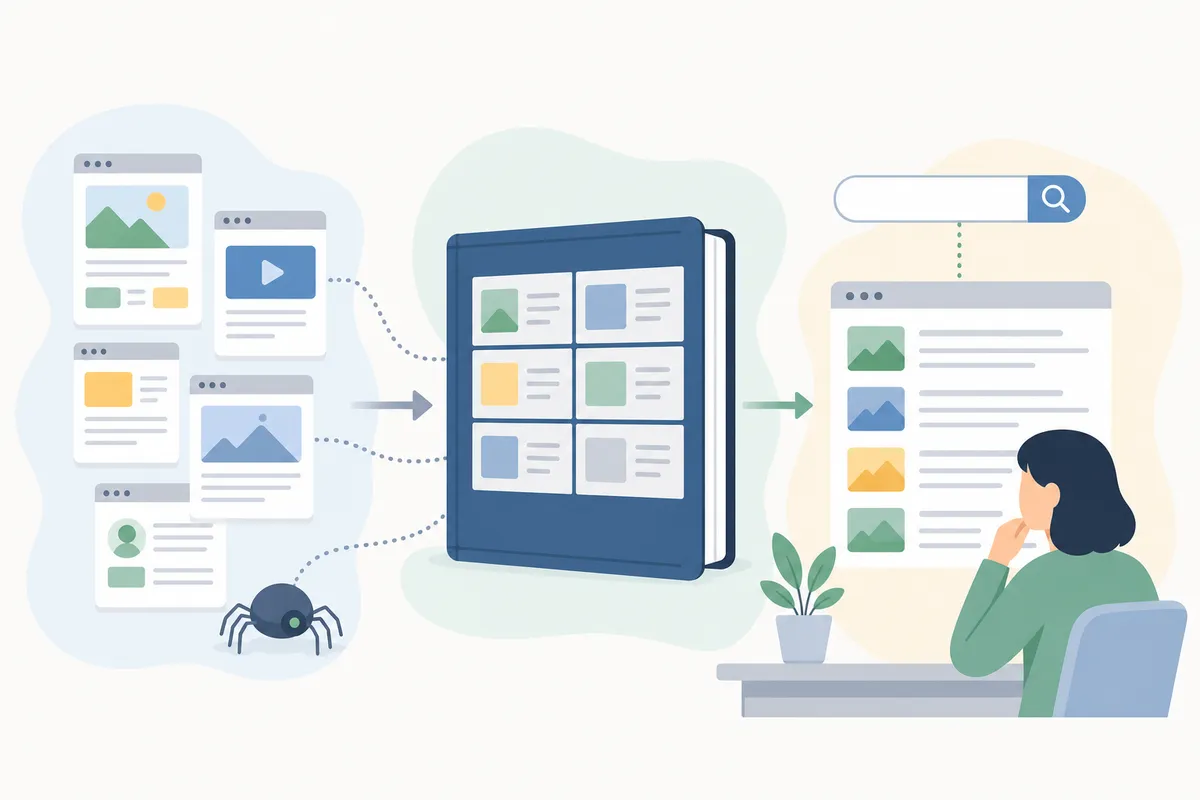
A search engine index is the enormous, continuously updated database a search engine builds by crawling and storing information about web pages. When you type in a query, this is what the engine actually searches, not the live internet.
The engine pulls matches from this pre-built index instead of scanning the web in real time, which is why results return in a fraction of a second even with billions of pages in play. The index holds each page's URL, a summary of its content, and metadata such as language, location relevance and mobile-friendliness.
Every major search engine maintains its own version of this structure, and getting into one doesn't automatically get you into another.
What is an inverted index?
An inverted index is the data structure that makes that instant lookup possible. Instead of organizing data by page ("this page contains these words"), it organizes by word: "this word appears on these pages."
When you search "best running shoes," the engine doesn't scan every page for those words. It looks up "best," "running" and "shoes" in the inverted index, pulls the list of pages already associated with each term, then intersects and ranks them.
This is a core reason search feels instantaneous at the scale of the modern web. It's also why keyword relevance still matters: if your page's words never got mapped into the right entries, it won't surface for the query even when it's otherwise well indexed. Clear, well-structured content of the kind described in a practical guide to on-page SEO gives the index clean language to work with.

Mobile-first indexing: why the version Googlebot sees matters
Since 2023, Google has indexed the mobile version of a page by default rather than the desktop version, a shift it calls mobile-first indexing. Google's Search Central team confirmed on its official blog that the migration was essentially complete across the web. Googlebot Smartphone is now the primary crawler used to build the index for virtually every site, and the legacy desktop crawler is reserved for a small number of exceptions.
What gets indexed is whatever the mobile version actually contains, not what a desktop visitor sees. Hiding content behind a mobile accordion or tab is generally fine and still gets indexed. Content left out of the mobile HTML entirely is a different story: trimmed navigation, shortened product descriptions or structured data added only to the desktop template simply isn't there for Google to index.
Sites still running a separate mobile subdomain, commonly an m. prefix, carry extra risk. If the mobile and desktop versions aren't linked correctly with matching rel=alternate and rel=canonical tags, Google can index the wrong version or treat the two as duplicates and drop one. It's the same canonicalization conflict covered above, triggered by device type instead of URL parameters.
The practical fix is responsive design, so there's one HTML document and one URL per page and the mobile/desktop mismatch disappears as a source of indexing problems. For sites that can't move off a separate mobile template quickly, the next best step is to audit the mobile version for every element you want indexed: text, images with alt text and structured data.
How big is the index? Numbers from Google and Bing

Google's own How Search Works explainer states that its index contains hundreds of billions of webpages and is well over 100,000,000 gigabytes in total size, built from systems running across data centers around the world. The figure moves, because Google has said the index is continuously rebuilt as pages are added, updated or removed. That is also part of why a page can drop out of it without any action from the site owner, as the FAQ below covers.
Microsoft doesn't publish as granular a figure for Bing. Bing's own Webmaster Blog has described its index as holding tens of billions of pages, built from its own crawler, Bingbot, and from data shared through partnerships. Those partnerships include the search data behind Yahoo's web results and behind DuckDuckGo's results for queries where DuckDuckGo doesn't rely on its own crawl.
The difference in scale is one reason a page can be comfortably indexed on Bing and still missing from Google, or the reverse. Each engine runs its own crawler, its own quality filters and its own index, so a diagnosis that only checks Google Search Console can miss a Bing-specific problem entirely.
Why search engine indexing matters for SEO

If a page isn't indexed, it has zero chance of ranking, of showing up in an AI Overview, or of earning organic traffic. Backlinks, keyword targeting and content quality only start paying off after indexing happens.
That makes indexing problems some of the most expensive mistakes on a site. A business can spend weeks producing content and never notice it's invisible to search engines until someone checks. Monitoring index status belongs alongside content production, not after it, which is why a structured 90-day SEO action plan usually includes an indexing check as an early milestone.
Indexing also acts as a quality filter. Google has said plainly that it only adds pages with genuine value to the index, so pages with keyword stuffing, low-quality link schemes or thin, duplicated content tend to get flagged or skipped. Core updates periodically reassess which pages across a site are worth keeping indexed at all. If a large share of a site's pages don't clear the bar, Google can pull back on crawling and indexing the rest of the site too, which is one reason a handful of weak pages can drag down a whole domain's visibility.
Why pages get skipped: common reasons indexing fails
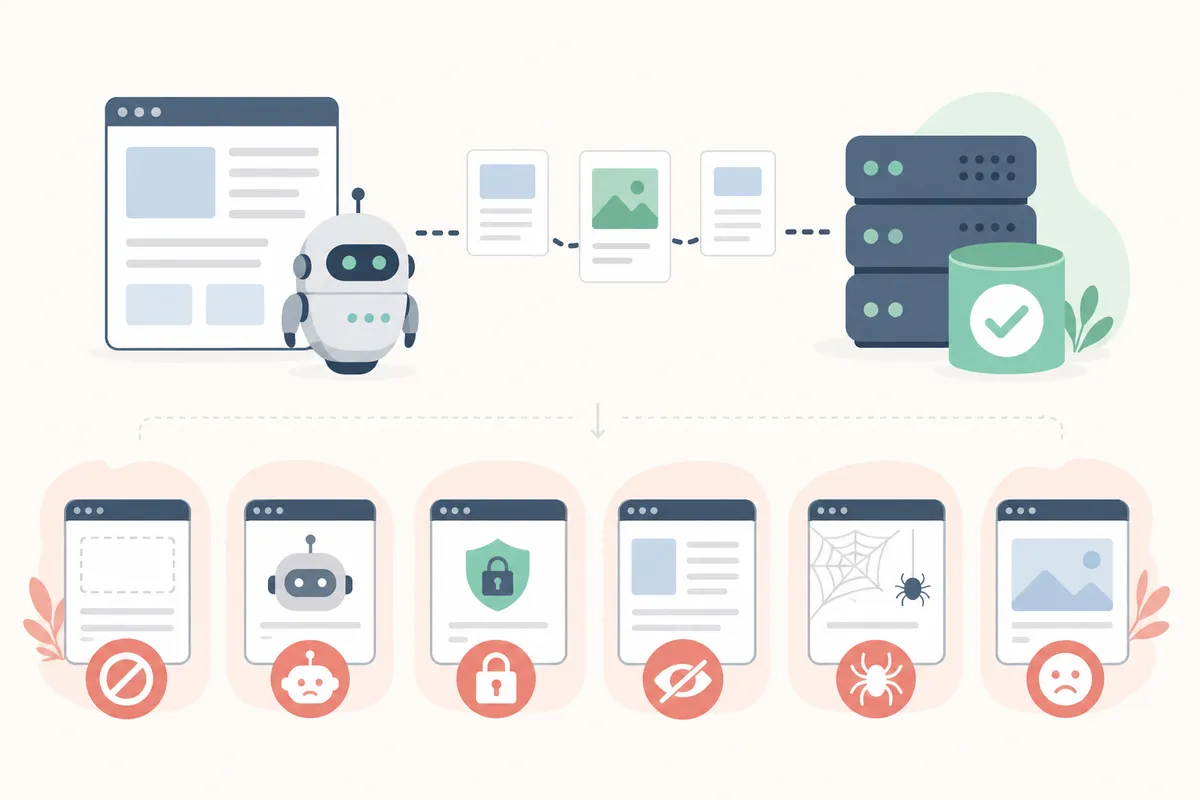
Pages don't get skipped randomly. There's almost always a specific, diagnosable reason, and most fall into a short list of repeat offenders.
Thin or duplicate content
Pages with little unique value are the single most common reason Google chooses not to index a page. Short product pages with manufacturer copy, near-duplicate location pages and auto-generated filters are typical examples. The crawler saw the content, but the search engine decided it wasn't worth storing separately.
Noindex tags and robots.txt blocks
A noindex meta tag or header tells a search engine directly not to index the page. These get left on pages by accident constantly, whether it's a staging-site tag that never got removed before launch or a CMS default that quietly noindexes certain page types. A robots.txt disallow rule has a related but different effect: it can block crawling entirely, which prevents indexing by extension. The robots.txt exclusion protocol is more than an informal convention, since the IETF formally standardized it as RFC 9309 in 2022, and compliant crawlers across different search engines all honor the same disallow syntax.
Crawl budget and site size issues
Search engines allocate a finite amount of crawling attention to each site, based roughly on its size, update frequency and server response health. On very large sites, low-value pages can eat crawl budget that should go to pages you actually want indexed, so some pages end up crawled rarely or not at all.
JavaScript-heavy pages and single-page apps
Search engines can render JavaScript, but it's a slower, more resource-intensive step than reading plain HTML, and it doesn't always succeed cleanly. Content that only appears after client-side JavaScript runs, common in single-page applications, can be missed or indexed late. This is a well-documented failure mode, and why single-page apps vanish from Google covers the mechanics in depth.
Canonicalization conflicts
When a page has a canonical tag pointing to a different URL, whether on purpose or by mistake, Google will generally index the canonical version instead of the one it crawled. A misconfigured canonical tag can quietly keep an otherwise good page out of the index in favor of the wrong URL.
| Reason Pages Get Skipped | What It Looks Like in Search Console | Typical Fix |
|---|---|---|
| Thin or duplicate content | "Duplicate, Google chose different canonical" or "Crawled – currently not indexed" | Consolidate or rewrite with unique, substantive content |
| Noindex tag or robots.txt block | "Excluded by 'noindex' tag" or "Blocked by robots.txt" | Remove the tag or update the disallow rule |
| Crawl budget limits (large sites) | "Discovered – currently not indexed" | Prune low-value pages; improve internal linking to priority pages |
| JavaScript rendering failures | Content missing from the cached/rendered version | Server-side render or pre-render key content |
| Canonicalization conflicts | "Alternate page with proper canonical tag" | Fix or remove incorrect canonical tags |
Most of these trace back to technical SEO fundamentals rather than content quality alone. If you're seeing a pattern of exclusions across many pages, work through the technical SEO fixes that actually move rankings before assuming the content is the problem.
A worked example: tracing one page from publish to index
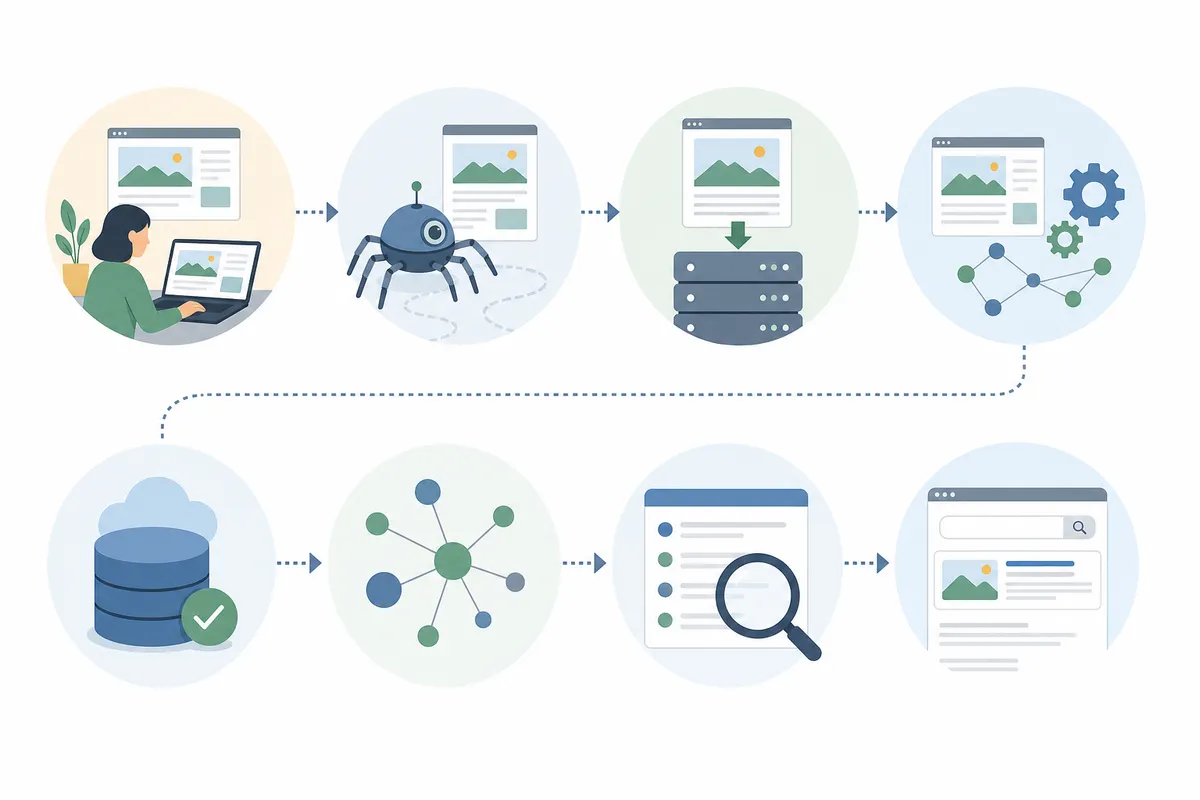
Here's a realistic sequence for a new blog post on an established site with a healthy crawl history, laid out against actual actions rather than treating indexing as a black box.
- Day 0: The page is published. The site's XML sitemap regenerates automatically, so the new URL is added to the sitemap file within minutes.
- Day 0-1: Other pages already link internally to the new post and the sitemap has updated, so Googlebot discovers the URL on its next scheduled crawl of the sitemap, typically within a day for an established domain.
- Day 1-3: Googlebot crawls and renders the page. Search Console's URL Inspection tool, checked manually on day 2, doesn't yet show "URL is on Google," but a crawl has been logged.
- Day 3-7: The page is evaluated for uniqueness and quality against the rest of the site's content. If it passes, it's added to the index, and the Coverage report around day 5-7 would typically show the URL move from "Discovered – currently not indexed" (if it ever appeared there) to "Indexed."
- Day 7 onward: The page can appear in search results and starts competing. Earning meaningful rankings for a competitive term may take considerably longer, but that belongs to the ranking stage, which runs independently of indexing.
Now take a brand-new domain with no backlinks and no crawl history. The same page might not be discovered at all until a sitemap is manually submitted through Search Console, since Googlebot has no established crawl pattern to follow and no internal link equity pulling it in. Once discovered, the crawl-to-index window can stretch from days into several weeks, and Google's own guidance acknowledges that new sites generally take longer to be crawled and indexed consistently than sites with an established history.
The difference between the two scenarios isn't the content but everything around it: sitemap freshness, internal linking and domain crawl history. It's why the same fix, such as requesting indexing through URL Inspection, produces a same-day result on one site and does almost nothing on another. The tool only nudges the queue; it doesn't override the signals the index decision rests on.
Can you fix indexing problems yourself?

Yes, for most common cases. Removing an accidental noindex tag, fixing a robots.txt rule, submitting a sitemap or requesting indexing for a single URL through Google Search Console are all things a site owner can do without specialized help, usually in under an hour.
Diagnosis is harder than execution. The fix for "Crawled – currently not indexed" might be a content rewrite, a canonical fix, an internal linking change or a crawl budget issue, and Search Console won't always say which applies. Reading the coverage report correctly, and knowing which exclusion reasons are urgent and which are expected, takes some familiarity with how indexing decisions get made.
A reasonable approach is to handle the mechanical fixes first: noindex tags, robots.txt and sitemap submission. If pages are still unindexed after a few weeks with no obvious cause, a deeper technical SEO audit earns its cost.
How to get your pages indexed faster
None of these methods force a search engine to index a low-quality page, since that decision still comes down to content and technical signals. What they do is shorten the delay between publishing and discovery, which matters a lot for time-sensitive content.
XML sitemaps
An XML sitemap is a file listing every URL on your site that you want search engines to know about. It works as a map for crawlers, pointing them toward pages they might otherwise miss, especially on large or deeply nested sites. Submitting one doesn't guarantee indexing, but it removes the "the crawler never found this page" problem.
To submit a sitemap in Google Search Console, open the Sitemaps report, click "Add a new sitemap," enter the sitemap URL (commonly yoursite.com/sitemap.xml) and submit. Bing Webmaster Tools has an equivalent Sitemaps section with the same basic flow.
Google Search Console's URL Inspection tool
For a single page that needs attention now, the URL Inspection tool lets you check a specific URL's indexing status and request a crawl directly. Paste the URL in, review any issues it flags, and if nothing's blocking the page, request indexing on the spot.
Use it for something like "I just fixed a noindex tag and want Google to notice quickly." It isn't designed for batch-submitting hundreds of URLs.
Google's Indexing API
Google's Indexing API lets you notify Google programmatically about new or updated URLs, without waiting for a sitemap crawl or a manual URL Inspection request. Google has positioned it as most useful for sites with short-lived content such as job postings, livestream pages and event listings, where speed matters more than coverage.
Setup requires creating a Google Cloud project and service account, verifying ownership in Search Console and generating an access token, which is a meaningfully more technical lift than a sitemap. Google still recommends submitting a full sitemap alongside it, because the API is a supplement rather than a replacement.
Bing Webmaster Tools and IndexNow
Bing Webmaster Tools includes its own URL submission feature, which allows up to 10,000 URLs per day to be submitted for near-immediate crawling and evaluation. Pages that meet Bing's quality bar can appear in results shortly after submission.
Bing also backs IndexNow, a protocol that lets a site ping search engines the instant a page is published, updated or deleted instead of waiting for the next scheduled crawl. Because participating engines share it, one submission can notify more than one of them. Microsoft has described IndexNow as a joint initiative it co-developed with Yandex, built to cut down on the repeated, speculative crawling both engines otherwise rely on to notice that a page changed.
Internal linking and backlinks
A page linked from other pages on your site, especially pages crawlers already visit often, is easier to find and signals that it's worth revisiting. Orphan pages, with no internal links pointing to them, are some of the slowest to get indexed. Fixing internal linking gaps is often a bigger lever than any submission tool, because it's a standing signal rather than a one-time ping.
External backlinks help too, since a crawler following a link from another site is one of the original ways it discovers new pages. Social signals can occasionally speed up discovery indirectly when a shared link gets clicked, crawled or linked onward, but they aren't a direct indexing mechanism the way a sitemap or the Indexing API is.
| Method | Search Engine(s) | Best Used For | Practical Limit | Typical Speed |
|---|---|---|---|---|
| XML sitemap | Google, Bing | Full-site coverage, ongoing discovery | One submission covers entire site | Days, revisited on crawl schedule |
| URL Inspection tool | A single urgent page | One URL at a time | Hours to a few days | |
| Indexing API | Google (job/livestream content officially) | Frequently changing, short-lived pages | Daily quota per project | Near-immediate once set up |
| Bing URL submission | Bing | Batch submission of new/updated pages | Up to 10,000 URLs per day | Near-immediate evaluation |
| IndexNow | Bing and participating engines | Instant notification on publish/update/delete | No fixed daily cap stated | Near-immediate ping |
How to check whether your pages are indexed

Before fixing an indexing problem, confirm it exists. A few methods are reliable.
- Google Search Console's Coverage/Indexing report shows which URLs are indexed, which are excluded and the specific reason for each exclusion. It's the most precise source of truth for Google.
- The
site:search operator (typingsite:yourdomain.com/page-urlinto Google) gives a quick, rough check, though it's known to be imprecise for exact counts. - Bing Webmaster Tools has its own index-coverage reporting, parallel to Google's, for Bing-specific status.
- The URL Inspection tool gives a definitive per-page answer for Google, including the last crawl date and any issues it detected.
Run the check regularly rather than once after launch. Pages can drop out of the index later because of a site redesign, an accidental noindex tag introduced in a template update, or a core update that reassesses content quality sitewide.
Google vs. Bing vs. DuckDuckGo: how indexing differs by engine
Not every search engine indexes the web the same way, and the differences affect how you'd diagnose a missing page.
| Engine | Own Crawler | Own Index | Typical Discovery Speed | Primary Submission Tool |
|---|---|---|---|---|
| Googlebot | Yes, hundreds of billions of pages per Google's own figures | Hours to weeks, depending on site authority | Search Console (sitemaps, URL Inspection, Indexing API) | |
| Bing | Bingbot | Yes, tens of billions of pages per Bing's own figures | Similar range to Google, often faster for small sites via IndexNow | Bing Webmaster Tools, IndexNow |
| DuckDuckGo | Limited (DuckDuckBot) | Partial; blends its own crawl with licensed results from Bing | Tied to whichever underlying source surfaces the page | No dedicated submission tool for most results |
Google and Bing both run large-scale crawler-and-index systems from the ground up, so the fixes in this guide, such as sitemaps, noindex audits and IndexNow, apply to both with only minor tool differences. DuckDuckGo is a different case. It has said publicly that it draws a large share of its web results from Bing's index rather than crawling the entire web independently, alongside its own crawler and hundreds of other sources. A page that's indexed and ranking on Bing is therefore far more likely to surface on DuckDuckGo than a page indexed only on Google, and there's no DuckDuckGo equivalent of Search Console for checking status directly.
If a business depends on visibility across engines, confirming a page is indexed on Bing covers more ground than it might seem, since that one index feeds more than one results page. Checking only site:yourdomain.com on Google and assuming the picture is the same everywhere is a common blind spot.
When to get professional help with indexing

Most one-off indexing issues are fixable without outside help. Bring in professional support when the pattern is broader than one page: large swaths of a site stuck in "Discovered – currently not indexed," a migration that tanked indexing sitewide, or a JavaScript framework that crawlers have never rendered properly.
These situations usually need someone who can read server logs, compare actual rendered HTML with what a crawler sees, and trace the issue through a stack of possible causes instead of one obvious one. If you publish new content regularly and want it well structured and indexable from the start, look at how your process handles writing SEO content that ranks before the problem compounds across dozens of pages.
FAQs
What's the difference between crawling and indexing?
Crawling is a bot discovering and visiting a page. Indexing is the search engine deciding to store that page's content in its database. A page can be crawled without ever being indexed.
How long does search engine indexing take?
It varies widely, from minutes for a well-established, frequently crawled site using the Indexing API or IndexNow, to several weeks for a new site with few internal or external links pointing to its pages.
Why would Google crawl my page but not index it?
This usually means Google judged the content too thin, too similar to another page it already has, or best represented by a different canonical URL. Technical blocks like noindex tags can also cause it.
Does submitting a sitemap guarantee indexing?
No. A sitemap only helps search engines discover a URL faster. Whether it gets indexed still depends on content quality and technical signals like noindex tags or canonicalization.
Can a page lose its indexed status after being indexed once?
Yes. Pages can be dropped from the index later due to content changes, accidental noindex tags, site migrations, or a reassessment during a core algorithm update.
Does Google index PDFs, images, and videos the same way as web pages?
Yes, with differences. Google can index PDFs and extract their text. Both Google and Bing index images and video through signals like alt text, file names and surrounding page content, as Google's own documentation on image and video indexing describes, rather than by visually understanding the file the way they parse HTML text.
How many pages does Google's index actually contain?
Google's How Search Works page states the index holds hundreds of billions of webpages. Google doesn't publish an exact, continuously updated count, because the figure changes as pages are added and removed.
Is there a way to see my total indexed page count?
The Pages report in Google Search Console's Indexing section is the most reliable count for your own site, broken down into indexed and non-indexed URLs with a reason for each exclusion. The site: operator gives a rough public-facing estimate, but Google has cautioned that it isn't accurate for exact counts.
Get your indexing issues diagnosed
Search engine indexing is the gate every page has to clear before it can rank, and most sites have at least a few pages quietly stuck behind it. The fastest way to find out where that's happening on your own site is to see your actual indexing and ranking data in one place. Talk to the team and get a sample report that shows which of your pages are indexed, which are at risk, and what's worth fixing first.
Related reading: Discourage Search Engines From Indexing This Site: A Setup Guide.
Related reading: "Discovered – Currently Not Indexed": What It Means and How to Fix It.
Related reading: SEO for News Sites: How to Get Articles Indexed and Ranking Fast.
Related reading: How to Get Google to Crawl My Site: A Step-by-Step Fix.
Sources
About the author
SearchBlueprint researched, wrote and scored this article with the content pipeline our customers run on their own sites. The score in the byline is what our content engine gave this page before it published. Nothing here is reviewed by hand, which is the point: it is the product's output, published where anyone can check it.