What Is SEO? How Search Engines Decide Who Gets Found
SearchBlueprint · · 14 min read · scored 100/100

What is SEO? Search engine optimization is the work of making your website easy for search engines to find and trust, so your pages appear in the unpaid results when people search for what you sell or know.
Google says it plainly in its own starter guide: there are no secrets that will rank your site first. What there is instead is a short list of things search engines need from a page, and a longer list of ways sites get in their own way. This guide covers both, in the order you would meet them on a real site.
SEO in plain English
A search results page has two kinds of listings. Ads sit at the top and bottom, and the business pays each time someone clicks. Between them sit the organic results, which are chosen by Google's systems and cost nothing per click. SEO is everything you do to earn and keep places in that second group.
The money point matters more than people expect. Google's page on hiring an SEO says advertising with Google has no effect on your presence in its search results, and that it costs nothing to appear in organic results. A sales call that blurs the two is a sales call to end.
When someone types "boiler repair Leeds" or "best CRM for a five-person agency", Google pulls a handful of pages out of the billions it has stored. It picks pages it could crawl and understand, then orders them by how well each one answers that exact search for that person, in that place. Your job is to pass all of those tests.
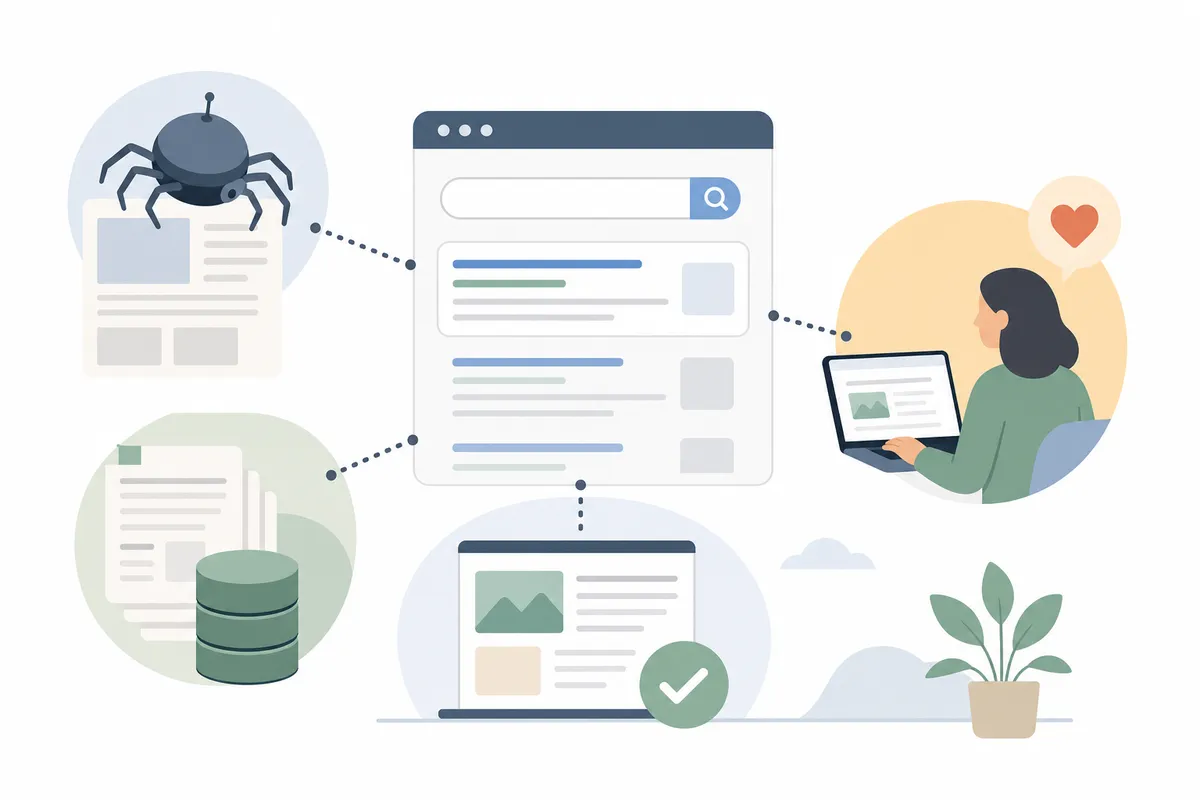
How Google turns your site into a search result
Google's own documentation describes three stages, and it adds a warning worth repeating to every client: not every page makes it through each one. Knowing which stage a page is stuck at tells you what to fix.
| Stage | What Google does | What usually goes wrong | How to check |
|---|---|---|---|
| Crawling | Finds URLs through links and sitemaps, then fetches the page and renders it in a recent version of Chrome | Server errors, robots.txt rules blocking Googlebot, pages behind a login | Search Console's URL Inspection tool, or the Googlebot simulator |
| Indexing | Reads the text, title, images and links, groups duplicates and picks one canonical version to keep | Thin or low-quality content, a noindex rule, duplicate URLs splitting the signals | The Page indexing report in Search Console |
| Serving | Matches the index against each search and orders results by relevance and quality | A page that answers a different question from the one people ask | The Performance report: which searches show the page, and where |
Crawling
There is no central list of every page on the web, so Google has to discover yours. It does that mostly by following links from pages it already knows, and partly from sitemaps you submit. Its crawler, Googlebot, then fetches the page and runs its JavaScript, much like your browser does. If the server times out or a robots.txt rule blocks the path, the page never gets past this stage.
A quick test costs nothing. Search Google for site:yourdomain.com. If your pages appear, Google has them. If nothing appears, no amount of writing will help until the block is found.
Indexing
Once a page is fetched, Google works out what it is about from the text, the title element, headings, image alt attributes and links. It also groups pages with the same content and picks one as the canonical, the version it may show. Google says indexing is not guaranteed and lists low-quality content and robots meta rules among the common reasons a page is left out.
Serving
When someone searches, Google looks through the index and returns what its systems judge most relevant and useful. Google says relevance draws on hundreds of factors, such as where the searcher is and which device they use. That is why "bicycle repair shops" shows a map in one city and different shops in another, and why your own position check from your office may not match what a customer sees.
What search engines reward
Every SEO course has a list of "ranking factors". Most of those lists are guesses. Google's own Search Essentials name a short set of practices that matter most, and they are less exotic than the lists suggest.
Content written for the person searching
Google asks for helpful, reliable, people-first content: pages made to help a reader, as opposed to pages made to attract search clicks. Its self-assessment questions are worth reading in full, and two of them do most of the work. Would someone who landed on your page leave feeling they learned enough to reach their goal? Does the page add something beyond what the other results already say?
This is also where most small sites lose. A page that restates the top three results earns nothing new for the searcher, so Google has little reason to show it above them.
The words people use
Google's essentials ask you to use the words people would use to look for your content, and to place them in prominent spots: the title, the main heading, alt text and link text. That sounds obvious until you check a real site and find a page called "Our solutions" for a service people search as "commercial cleaning". Keyword research is the habit of finding those words before you write, and our guide to the role of keywords in SEO covers how to choose them. Our academy lesson on keyword research from scratch walks through it with free tools.
Links from other sites
A link from another site is a signal that someone found your page worth pointing to. Google confirms that PageRank, its link-based algorithm, is one of its fundamental systems, and in the same breath says it is one signal among many. Links you buy or trade to manipulate rankings are link spam under Google's spam policies, and that covers paid posts, product-for-link swaps and "link to me and I'll link to you" pages.
A page that works well on a phone
Google's page experience guidance asks whether pages have good Core Web Vitals and display well on mobile, among other questions. Core Web Vitals are used by its ranking systems. The thresholds Google publishes on web.dev are a Largest Contentful Paint within 2.5 seconds, an Interaction to Next Paint of 200 milliseconds or less, and a Cumulative Layout Shift of 0.1 or less, measured at the 75th percentile of real visits.
Five things Google says do not matter
The same starter guide spends a full section on beliefs Google wants site owners to drop. They come up in client calls every week, so they are worth having in writing.
| Belief | What Google's starter guide says |
|---|---|
| The meta keywords tag helps | Google Search does not use the keywords meta tag |
| Pages need a set word count | Length alone does not matter for ranking; there is no minimum or maximum |
| Duplicate content brings a penalty | Content reachable at several URLs is fine, though it can waste crawling |
| E-E-A-T is a ranking factor | It is not, in Google's words |
| Keywords must be in the domain name | Keywords in a domain or URL path alone have hardly any effect on ranking |
None of this means quality and trust are irrelevant. It means you cannot tick a box marked "E-E-A-T" or hit 2,000 words and expect a result. The work is the page itself. Our glossary entry on E-E-A-T covers what Google's raters look for and why it shapes the systems without being one.

The three kinds of SEO work
Nearly every SEO task belongs to one of three groups. Naming the group tells you who should do the task and what kind of result to expect.
| Kind | What it covers | Typical tasks | What changes when it works |
|---|---|---|---|
| On-page SEO | The words and HTML of each page | Matching the page to what searchers want, titles, headings, internal links, images with alt text | The page you worked on climbs for its searches |
| Technical SEO | Whether Google can crawl, render and index the site | Fixing crawl errors, sitemaps, canonical tags, page speed, mobile layout | Every page on the site gets a fair hearing |
| Off-page SEO | Your reputation on other sites | Earning links and mentions, reviews, local listings | Competitive searches become reachable |
On-page work is where most businesses should start, because it is entirely in your control and you see results page by page. Technical work is invisible when it is done well and very visible when it breaks: one wrong robots.txt line can remove a site from search. Off-page work is the slowest, because it depends on other people choosing to mention you, and that is also what makes it hard for a competitor to copy. For a deeper split with examples, see on-page vs off-page vs technical SEO.
A business that serves customers in one area has a fourth job layered on top: local SEO, which adds your Google Business Profile, reviews and citations to the mix. Our guide to local SEO and the map pack covers that part.
SEO and AI answers
Search no longer ends at ten blue links. Google shows AI Overviews at the top of some results and offers AI Mode for longer questions, while ChatGPT and Perplexity answer without a results page at all. Owners ask whether they now need a second, separate strategy.
For Google's AI features the answer from Google is no. Its guide to AI features and your website says there are no additional requirements to appear in AI Overviews or AI Mode, and no special schema or AI text file to add. To be shown as a supporting link, a page must be indexed and eligible to appear with a snippet. Both features may use a "query fan-out", running several related searches across subtopics to build one answer, so a page that answers one sub-question clearly can be cited even when it would not rank first for the main search.
Two practical points follow. Traffic from AI Overviews and AI Mode is counted inside Search Console's Performance report under the Web search type, so you measure it where you measure the rest. And because an AI answer is built from quoted sentences, a page that states its answer early, in a sentence that stands on its own, gives these systems something to use. Our lesson on how AI search picks its sources goes further.
SEO compared with paid search
Owners often ask whether to spend on ads or on SEO. They do different jobs, and most businesses that sell online end up using both.
| SEO | Paid search | |
|---|---|---|
| What you pay for | Time, content and sometimes tools or help | Each click, at an auction price |
| When results start | Weeks to months | As soon as the campaign is approved |
| When you stop paying | Rankings fade slowly, pages keep working for a while | Traffic stops the same day |
| Where you appear | Organic results, local pack, AI answers | Ad slots marked "Sponsored" |
| Who controls placement | Google's ranking systems | Your bid and the ad's quality |
A sensible split for a new business is ads for the searches that need customers this month, and SEO for the searches you want to own next year.
How long SEO takes
Google is specific about this in the starter guide: some changes take effect in a few hours, others take several months, and you generally want to wait a few weeks before deciding whether a change worked. Anyone promising first place by next Friday is contradicting the search engine they claim to understand.
In practice the order is predictable. Fixing a block, such as a noindex tag left on from a site build, shows fastest because it removes a hard stop. A new page takes longer, because it has to be crawled, indexed and then compared with pages that have been ranking for years. Authority from links moves slowest of all.
Competition sets the clock as much as your effort does. "Accountant" is a hard search to win. "Accountant for Shopify store owners in Manchester" is far easier. It brings fewer searches, from people much closer to hiring. Most plans that work start with the specific searches and widen as the site earns trust.
How to start: a first month for a small site
You can do this without a developer on most website builders. Work through it in order, because each step depends on the one before.
- Search
site:yourdomain.comon Google and note which of your important pages are missing. Our Google search operators tool builds the query if you want to combine it with other filters. - Verify your site in Google Search Console and submit your sitemap. It is free, and Google will email you when it finds problems. The lesson on Search Console essentials covers setup.
- List the searches each page should answer. One page, one main search, so two of your pages are not competing for the same query.
- Rewrite the title and main heading of each important page so they say what the page offers in the words customers use.
- Fix anything that makes the site slow or awkward on a phone. Oversized images are the usual first suspect.
- Link your pages to each other where a reader would want the next step, with link text that describes the page it points to.
- Ask the people you already work with, such as suppliers, partners and local associations, whether a link to you would help their readers.
After four weeks, open the Performance report and look at impressions by page. Impressions rise before clicks do, so they are the first sign the work is being noticed.
Doing it yourself or hiring help
Google's own page on whether you need an SEO says that if you run a small local business, you can probably do much of the work yourself, and it points owners to its starter guide first. It also lists what good consultants do, from content reviews and keyword research to technical advice on hosting and redirects. Optimizing for generative AI is on that list too.
If you hire, Google's advice doubles as a vetting checklist:
- Ask for examples of previous work, and whether they follow Google Search Essentials.
- Ask what results they expect by when, and how they measure success.
- Grant only read access to Search Console while they audit the site.
- Walk away from anyone who guarantees first place, claims a special relationship with Google or offers a "priority submit".
- Expect every change to your site to be explained, and never agree to link back to the SEO as part of the deal.
Google adds one more line agencies should take seriously: it does not evaluate or endorse third-party SEO tools, and those tools have no access to its internal ranking data. A good audit cites Google's own documentation for its recommendations. A weak one cites the tool.
How to explain SEO to a client in one minute
If you run an agency, this is the version that tends to land with an owner: "Google has to find your pages, understand them, and believe they are the best answer. We check each of those three steps, fix what is broken, then write the pages your customers are searching for and get other sites to point to them. You will see impressions move within weeks and enquiries over months, and we will show you both in Google's own data." It uses the stages Google itself describes, and it promises a measurement you can check rather than a position.

How to measure whether SEO is working
Rankings are the number people ask about and the weakest one to manage by. Search Console's Performance report gives four measures for your site in Google results:
- Clicks: how many times someone clicked through to your site.
- Impressions: how many times your site appeared in results.
- CTR: clicks divided by impressions.
- Average position: the average position of your topmost result.
Read them by page and by query. A page with many impressions and few clicks usually has a title or description that does not match what people searched; rewriting it is one of the cheapest wins in SEO. A page with no impressions after a month has a crawling or indexing question to answer first. Then connect the clicks to what pays the bills, such as enquiries, bookings or sales, in your analytics tool, because traffic that never converts is a cost.
FAQs
Is SEO free?
The clicks are free and the work is not. Google never charges for an organic listing. Earning one costs time, and sometimes tools or a consultant.
What is an example of SEO?
A plumber whose page is titled "Services" renames it "Emergency plumber in Bristol, 24 hours", adds a section answering the questions callers ask, and gets listed by two local trade associations. Each of those changes helps Google understand and trust the page for that search.
Is SEO dead now that people use AI chatbots?
No. Google's AI Overviews and AI Mode cite pages from its index, and Google says the same SEO practices apply. A page Google can crawl and understand is a page these systems can quote.
Can I do SEO myself?
For a small site, mostly yes. Google says a small local business can probably do much of the work itself. Hire help when the market is competitive, the site is large, or a migration or redesign is coming.
What is the difference between SEO and SEM?
SEO earns organic listings. SEM, search engine marketing, usually means paid search ads, and sometimes covers both. Ads buy placement now; SEO builds placement that lasts.
Your next step
So what is SEO, in one line? It is the work of making each important page one that Google can crawl, keep in its index and pick as the best answer to the search you care about. Check one of your own pages against those three stages. Our free SEO audit tool checks one page for the on-page and indexing basics with no signup, so you can see which stage to work on first.
Sources
The facts in this guide come from these pages, each read on the date shown.
- SEO Starter Guide (Google Search Central, read 12 October 2026)
- In-depth guide to how Google Search works (Google Search Central, read 12 October 2026)
- Google Search Essentials (Google Search Central, read 12 October 2026)
- Do you need an SEO? (Google Search Central, read 12 October 2026)
- AI features and your website (Google Search Central, read 12 October 2026)
- Creating helpful, reliable, people-first content (Google Search Central, read 12 October 2026)
- Spam policies for Google web search (Google Search Central, read 12 October 2026)
- Understanding page experience in Google Search results (Google Search Central, read 12 October 2026)
- Web Vitals (web.dev, read 12 October 2026)
- Performance report (Search results) (Search Console Help, read 12 October 2026)
About the author
SearchBlueprint researched, wrote and scored this article with the content pipeline our customers run on their own sites. The score in the byline is what our content engine gave this page before it published. Nothing here is reviewed by hand, which is the point: it is the product's output, published where anyone can check it.